Bug 916 - Applet opaque on gnome-panel
Status:
RESOLVED FIXED
Component:
GUI
Version:
1.9.1
Hardware:
PC Linux
Importance:
P5 cosmetic
Target Milestone:
---
Assignee:
Rob Caelers
URL:
Depends on:
Blocks:
Reported:
Jun 1 2010 08:31:46 UTC
by:
Carlo de Wolf
Modified:
Jul 5 2010 20:42:19 UTC
| Id | Who | When | Size | Type |
|---|---|---|---|---|
| 217 | gnome-panel with applet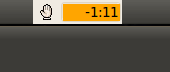 | |||
| Carlo de Wolf | Jun 2 2010 23:36:41 UTC | 1662 | image/png | |
| 218 | It works now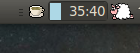 | |||
| Carlo de Wolf | Jun 2 2010 23:39:11 UTC | 7311 | image/png | |
| Who | When | What | Removed | Added |
|---|---|---|---|---|
| Carlo de Wolf | Jun 2 2010 23:38:18 UTC | attachments.isobsolete | 0 | 1 |
| Carlo de Wolf | Jun 3 2010 08:22:40 UTC | attachments.isobsolete | 1 | 0 |
| Rob Caelers | Jul 5 2010 20:42:19 UTC | status | NEW | RESOLVED |
| resolution | FIXED |
Description
Carlo de Wolf Jun 1 2010 08:31:46 UTC
After installation of Ubuntu 10.04 the applets background is shown in light grey instead of the panels background color.
Comment 1
Rob Caelers Jun 2 2010 20:15:08 UTC
I cannot reproduce this (also with ubuntu 10.04). I have a few questions:

- are using gnome?
- Are you referring to the timer in the gnome notification area or workrave applet (the one you explicitly have to add to the panel using 'Add to Panel...' menu)?
- Could you please attach a screenshot that shows the problem?

Note that the background of the timer progress bar is determined by the selected theme (not the panel color) and is always a solid color.

Thanks!
Comment 2
Carlo de Wolf Jun 2 2010 23:36:41 UTC
Created attachment 217
gnome-panel with applet
Comment 3
Carlo de Wolf Jun 2 2010 23:39:11 UTC
Created attachment 218
It works now

I had to remove the old applet from the panel. A new applet appeared then within the notification area which has the correct transparency.
Comment 4
Carlo de Wolf Jun 3 2010 08:27:48 UTC
After reboot I found that Workrave did not run anymore.

Adding the Workrave applet to the gnome-panel results in the opaque timers as shown in 'gnome-panel with applet'.

Adding Workrave to 'Startup Applications' resulted in a working transparent applet in the notification area. (See 'It works now'.)

So the bug appears to be on adding the applet manually to the gnome-panel.
While the option of adding Workrave to 'Startup Applications' is an acceptable work-around, I find it not too user friendly.
Comment 5
Rob Caelers Jul 5 2010 20:42:19 UTC
I finally managed to reproduce this bug. It seems that the problem only occurs when the theme default background color is used; not when a custom background color is selected.  Now fixed. Thanks!

(commit 50e2474f4dae46630e5d61a58c1868d2ce8e0c84)