Bug 886 - Crash upon micro break
Status:
RESOLVED FIXED
Component:
Core
Version:
1.9.1
Hardware:
PC Windows Vista
Importance:
P4 critical
Target Milestone:
---
Assignee:
Rob Caelers
URL:
Depends on:
Blocks:
Reported:
Jan 25 2010 10:10:32 UTC
by:
mc**@gm**.com
Modified:
Sep 4 2010 16:18:07 UTC
| Id | Who | When | Size | Type |
|---|---|---|---|---|
| 207 | error message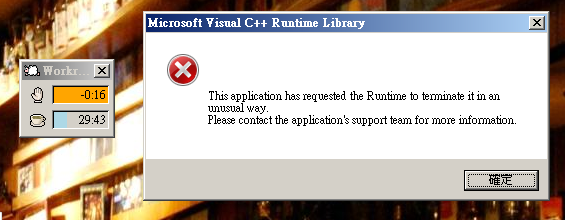 | |||
| mc**@gm**.com | Jan 25 2010 10:10:32 UTC | 110779 | image/png | |
| Who | When | What | Removed | Added |
|---|---|---|---|---|
| Rob Caelers | Sep 4 2010 16:18:07 UTC | status | NEW | RESOLVED |
| resolution | FIXED |
Description
mc**@gm**.com Jan 25 2010 10:10:32 UTC
Created attachment 207
error message

The problem started to occur from 2 to 3 weeks ago. Everytime when the micro break occurs, error message will pop out saying: "This application has requested the Runtime to terminate it in an unusual way. Please contact application's support team for more information". Then Workrave will terminate.
No error log is generated.
Comment 1
mc**@gm**.com Apr 27 2010 04:29:59 UTC
I tried reinstalling the Microsoft Visual C++ 2008 Redistributable Package at
http://www.microsoft.com/downloads/details.aspx?familyid=9B2DA534-3E03-4391-8A4D-074B9F2BC1BF&displaylang=en
I did a repair, didn't work. I then uninstalled it, and installed it again. Still didn't work.
The error message as in the attached screenshot still appears. Also note that if I leave the error message open, the micro break window will work fine. However  after I close that error message Workrave itself will crash.
Comment 2
Rob Caelers Jun 2 2010 20:27:44 UTC
Could you please try disabling sounds? An other user reported crashes disappeared when sound was turned off. Thanks
Comment 3
mc**@gm**.com Jun 27 2010 13:28:43 UTC
(In reply to comment #2)
> Could you please try disabling sounds? An other user reported crashes
> disappeared when sound was turned off. Thanks

Disabling sound does solve the crash problem. Thanks a lot!
Comment 4
Rob Caelers Sep 4 2010 16:18:07 UTC
Workrave 1.9.2 (released a couple of days ago) has a number of stability fixes
in the windows sound player. Please upgrade and check if sound is working
properly. If not, you can reopen this issue. (see also issue #909)