Bug 852 - Workrave does not instlall on Vista 64bit
Status:
ASSIGNED
Component:
Core :: Win32
Version:
1.9.0
Hardware:
PC Windows Vista
Importance:
P1 blocker
Target Milestone:
---
Assignee:
Raymond Penners
URL:
Depends on:
Blocks:
Reported:
Aug 25 2009 12:45:33 UTC
by:
Frederik Pfisterer
Modified:
Oct 17 2009 10:27:18 UTC
CC List:
Ray Satiro
Rob Caelers
| Id | Who | When | Size | Type |
|---|---|---|---|---|
| 193 | unable to register dll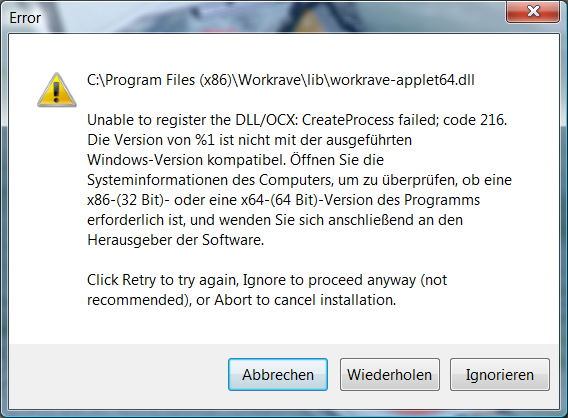 | |||
| Frederik Pfisterer | Aug 25 2009 12:45:33 UTC | 55591 | image/png | |
| 198 | File List of the workrave directory in the moment of crashing. | |||
| Frederik Pfisterer | Oct 17 2009 10:27:18 UTC | 36645 | text/plain | |
| Who | When | What | Removed | Added |
|---|---|---|---|---|
| Rob Caelers | Sep 19 2009 15:51:29 UTC | cc | Rob Caelers | |
| Ray Satiro | Oct 16 2009 22:48:12 UTC | cc | Ray Satiro | |
| status | NEW | ASSIGNED |
Description
Frederik Pfisterer Aug 25 2009 12:45:33 UTC
Created attachment 193
unable to register dll

When installing Workrave i get the attached Error.

Let me know once a fix is available.
Thanks.
Comment 1
Rob Caelers Sep 19 2009 15:51:29 UTC
I cannot reproduce this problem on 64 bit Vista and Windows 7.

Could you please open a Command Prompt (as Administrator) and run:
regsvr32 "c:\Program Files (x86)\Workrave\lib\workrave-applet64.dll"

Does this give an error?

Could you please try a recent snapshot: http://workrave.org/download/snapshots/20090919/workrave-win32-v1_9-20090919-installer.exe

Thanks
Comment 2
Frederik Pfisterer Sep 19 2009 16:01:55 UTC
Tried with recent snapshot from http://workrave.org/download/snapshots/20090919/workrave-win32-v1_9-20090919-installer.exe

Error still occurs. Used Vista Business 64bit.

Running regsvr32 from commandline gives me an error saying
C:\Windows\system32\regsvr32.exe is not compatible with the running windows version. (Note: i do not have dual boot or anyhting, it's a regular Dell Latitude with vista 64bit preinstalled)

Thanks for caring,
Fred
Comment 3
Rob Caelers Sep 19 2009 17:49:29 UTC
Weird. Is SP1/2 installed?

How about this?

C:\Windows\SysWOW64\regsvr32.exe "\Program Files (x86)\Workrave\lib\workrave-applet64.dll"
Comment 4
Frederik Pfisterer Sep 20 2009 11:46:48 UTC
C:\Windows\SysWOW64\regsvr32.exe seems to execute fine
however it can't find
"\Program Files (x86)\Workrave\lib\workrave-applet64.dll"
... of course, because it's not there.

SP1 is installed.

Thanks,
Fred
Comment 5
Rob Caelers Oct 11 2009 13:27:08 UTC
Weird, If workrave-applet64.dll is not installed in \Program Files (x86)\Workrave\lib, the installers seems to think you are running a 32bit system. Are you starting the Workrave installer is some compatibility mode?
Comment 6
Frederik Pfisterer Oct 11 2009 13:36:46 UTC
No. I'm not running any sort of compatibility mode. I have a lot of 32bit software that woks just fine and the few 64bit apps never made any trouble.
Can't you test registering it with C:\Windows\SysWOW64\regsvr32.exe first and then use the other one as fallback?
Comment 7
Ray Satiro Oct 16 2009 22:48:12 UTC
Workrave 1.9.0 was tested on Server 2003 x64, Vista x64, and later on Windows 7 x64 (pre-RTM builds). The only known applet issue was missing Deskband2 support to allow for taskbar translucency.

In certain circumstances the applet can fail to install when an older version of it is already running. In some installer revisions I think it had unloaded the applet first but explorer.exe is stubborn and the process sometimes can take a few minutes. If the old applet file handle is not actually released by explorer in time when the installer tries to copy a new applet it will fail and leave a .tmp file.

Failure to install the applet will also happen when the installer is not running with administrator privileges.

Do you have AV? Kaspersky and AVG sometimes have problems with anything not in their database and can crush a DLL.

I would like to identify what could have caused the issue you describe.

Can you please run the command 'winver' and tell us what build you're running?
Also what language(german?), and what edition (ultimate, home premium, etc.)

Please upload a list of files in your Workrave directory.
If your "program files(x86)" directory is on your C drive for example, you would run this in a command window (all one line):
dir /on /n /s "c:\program files(x86)\workrave" > "%USERPROFILE%\Desktop\workrave_file_list.txt"

Please upload workrave_file_list.txt

Thanks,

Ray
Comment 8
Frederik Pfisterer Oct 17 2009 10:26:25 UTC
Hi Ray,

I have Symantec AV. Tried installing the current snapshot with AV turned off but it still gives me exactly the same error. I do also not have an older version of the applet running because it did not install on the very first try.

Winver gives ma the following data:
MS Winows Vista Business
Version 6.0 (Build 6001: Service Pack 1)
German
Physical Memory: 4.191.276 KB

I attach the workrave_file_list.txt in the state when the error window is open. As soon as the error window is closed all changes are rolled back and the workrave directory is deleted.

Thanks (I really want this software ;-)
Fred
Comment 9
Frederik Pfisterer Oct 17 2009 10:27:18 UTC
Created attachment 198
File List of the workrave directory in the moment of crashing.