Bug 825 - Some great features that workrave could maybe take on!
Status:
RESOLVED WONTFIX
Component:
GUI
Version:
1.9.0
Hardware:
PC Windows XP
Importance:
P5 enhancement
Target Milestone:
---
Assignee:
Rob Caelers
URL:
Depends on:
Blocks:
Reported:
Mar 19 2009 12:01:09 UTC
by:
RaiGal
Modified:
Mar 26 2009 19:05:16 UTC
CC List:
Ray Satiro
| Id | Who | When | Size | Type |
|---|---|---|---|---|
| 182 | suspend timer when inactive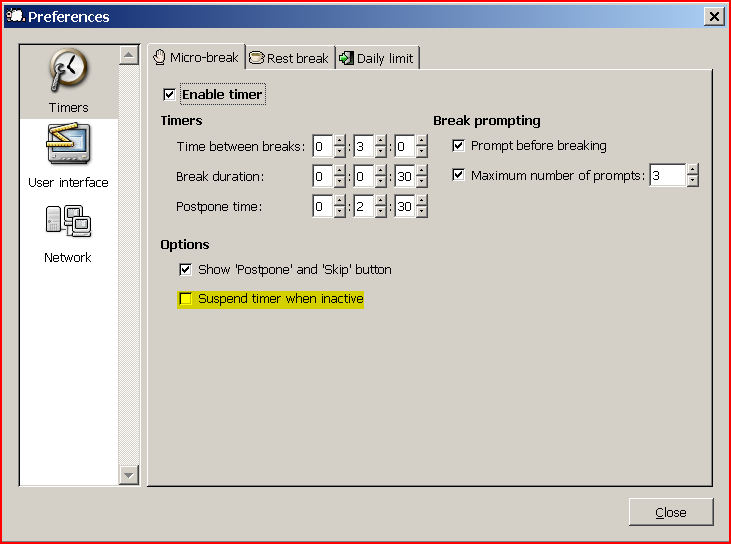 | |||
| Ray Satiro | Mar 26 2009 05:02:38 UTC | 38897 | image/png | |
| Who | When | What | Removed | Added |
|---|---|---|---|---|
| Ray Satiro | Mar 26 2009 05:03:48 UTC | cc | Ray Satiro | |
| status | NEW | RESOLVED | ||
| resolution | WONTFIX |
Description
RaiGal Mar 19 2009 12:01:09 UTC
Hey there,
First of all i wanted to say thanks for writing such a great program,it really has really benefited me like no other program ever has.
There are two little things that i would ask you to consider in future releases.

I think a function that would make workrave not pop-up whilst a user defined application is active (Browse to a directory and select an .exe file would
be awesome) or in full screen would be really useful.I know this discards the whole idea of health warnings,however there are certain times you just
can't take a break.As soon as the specified program ends a workrave warning box could pop up saying "You have been working for XX minutes,skipping
X breaks,please take a big break!

An override function to the previous function which can send out a warning message if a specified amount of time for example 2 hours has been passed
and thus running non stop, would be great!


I casually tend to watch DVD's on my computer,and whilst i might be watching it for over 3 hours there isn't any keyboard or mouse movement to alert
workrave to give me a warning.What would be really cool is an option to make workrave count down even if there isn't any keyboard/mouse traffic,working
solely if a user defined application (same as the first time,xxxx.exe) is running for example  vlc.exe or wmp.exe!

Thanks a lot for your time,greatly appreciated! :)
Comment 1
Ray Satiro Mar 26 2009 05:02:38 UTC
Created attachment 182
suspend timer when inactive

You can prevent the popups by switching to Quiet mode. Right-click the Workrave icon and select Mode > Quiet.

A timer will continue to count down if there is no activity and if you have chosen not to suspend the timer when it is inactive (see screenshot).

As for your request to allow application specific behavior, this does defeat the point of Workrave. You can choose to postpone your break.

I'm glad you like the program and thank you for writing.
Comment 2
RaiGal Mar 26 2009 19:05:16 UTC
Thanks!Keep up the good work :)