Bug 819 - Pop -up excercise window wanted !
Status:
RESOLVED INVALID
Component:
Core :: Win32
Version:
1.9.0
Hardware:
PC Windows Vista
Importance:
P5 enhancement
Target Milestone:
---
Assignee:
Rob Caelers
URL:
Depends on:
Blocks:
Reported:
Feb 27 2009 16:08:39 UTC
by:
ru**@gm**.com
Modified:
Nov 17 2014 03:59:15 UTC
CC List:
Filipus Klutiero
Rob Caelers
| Id | Who | When | Size | Type |
|---|---|---|---|---|
| 177 | Workrave rest break preferences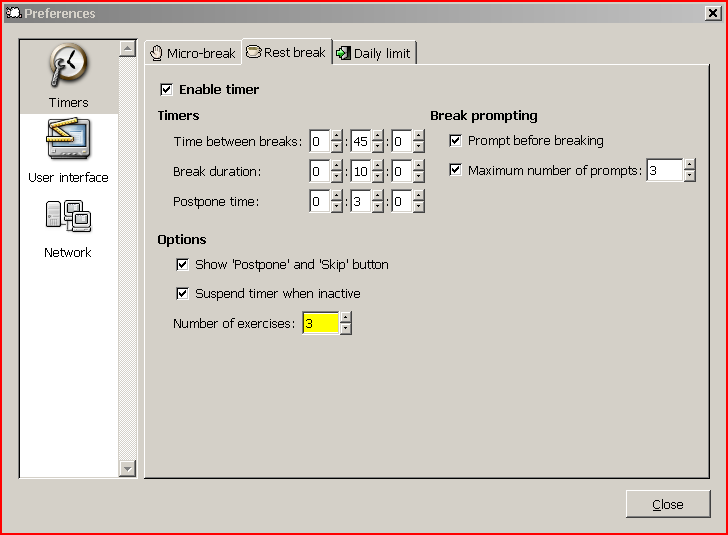 | |||
| Ray Satiro | Mar 1 2009 22:11:26 UTC | 38060 | image/png | |
| Who | When | What | Removed | Added |
|---|---|---|---|---|
| Ray Satiro | Mar 1 2009 22:11:26 UTC | status | NEW | ASSIGNED |
| assigned_to | Raymond Penners | Ray Satiro | ||
| Rob Caelers | Mar 29 2009 13:17:27 UTC | cc | Rob Caelers | |
| Filipus Klutiero | Nov 16 2014 22:30:40 UTC | cc | Filipus Klutiero | |
| Ray Satiro | Nov 17 2014 03:59:15 UTC | status | ASSIGNED | RESOLVED |
| assigned_to | Ray Satiro | Rob Caelers | ||
| resolution | INVALID |
Description
ru**@gm**.com Feb 27 2009 16:08:39 UTC
Great program ! I was wondering if the excercise window is supposed to pop up on breaks ? It doesn't om my PC, but I would prefer it !
Is there any settings or tricks for this ? I have used WorkPace before and it had this feature, whichs is great !

Thanks for your reply !
Comment 1
Ray Satiro Mar 1 2009 22:11:26 UTC
Created attachment 177
Workrave rest break preferences

Workrave is set by default to show exercises. However, there is a bug in 1.9.0 and earlier versions where the exercise and break windows aren't always on top of other windows.

Please check your rest break exercise preferences (see attached screenshot) and let us know whether or not you have exercises set.
Comment 2
ru**@gm**.com Mar 3 2009 17:19:23 UTC
Trieed everything, but no exercises pop up ! I was wondering if it could habe something to do with the fact that I am using one desktop spread across 2 screens,
nr 1 is a lcd 24 " and the other is 17" laptopscreen ?
Comment 3
Ray Satiro Mar 12 2009 05:04:44 UTC
Please power off your external monitor and let us know if the exercises window appears. Also, after that, please try again with your external monitor powered on and let us know if there is any change.

Do you use any special software to work with dual monitors?

Thanks,

Ray
Comment 4
Rob Caelers Mar 29 2009 13:17:27 UTC
Workrave only shows exercises on the first monitor. When you select 'restbreak now' from the menu, do you get a break window on each monitor? Are both windows lacking exercises?
Comment 5
Filipus Klutiero Nov 16 2014 22:30:40 UTC
If this is about micro-breaks, this affects me too. I installed Workrave 1.10.4 on Debian testing and Windows 8, and I do not get suggestions on either.
Comment 6
Ray Satiro Nov 17 2014 03:59:15 UTC
I have relinquished this bug to Rob since I'm no longer working on the project, and also I'm closing it as RESOLVED/INVALID since it has been open for several years, couldn't be reproduced and the reporter did not follow up.

(In reply to Filipus Klutiero from comment #5)
> If this is about micro-breaks, this affects me too. I installed Workrave
> 1.10.4 on Debian testing and Windows 8, and I do not get suggestions on
> either.

There are no exercises for the micro breaks, that is normal. You should see a number of exercises on your rest break however, depending on the value of Preferences > Timers > Rest break > Number of exercises.