Bug 813 - Huge performance hit when using workrave
Status:
ASSIGNED
Component:
Core :: Win32
Version:
1.9.0
Hardware:
PC Windows XP
Importance:
P5 major
Target Milestone:
---
Assignee:
Ray Satiro
URL:
Depends on:
Blocks:
Reported:
Jan 28 2009 06:10:12 UTC
by:
Josh Campbell
Modified:
Mar 12 2009 04:53:23 UTC
CC List:
Rob Caelers
| Id | Who | When | Size | Type |
|---|---|---|---|---|
| 172 | description | |||
| Josh Campbell | Jan 28 2009 06:11:10 UTC | 9697 | application/pdf | |
| 173 | workrave thread list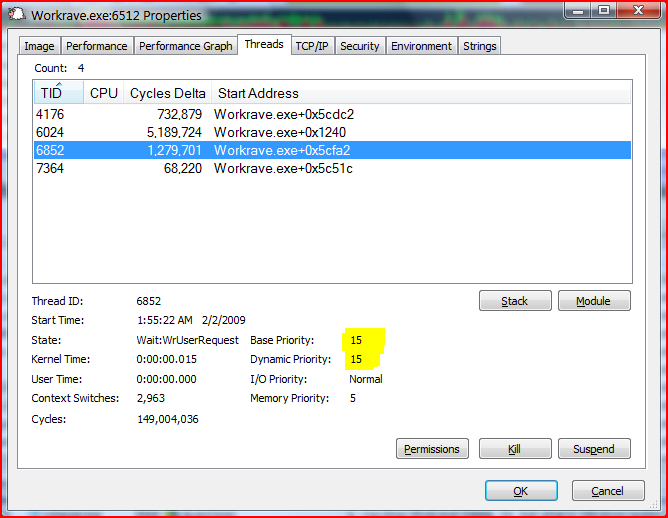 | |||
| Ray Satiro | Feb 2 2009 08:03:56 UTC | 92672 | image/png | |
| Who | When | What | Removed | Added |
|---|---|---|---|---|
| Rob Caelers | Jan 28 2009 18:51:45 UTC | cc | Rob Caelers | |
| Ray Satiro | Feb 2 2009 08:03:56 UTC | status | NEW | ASSIGNED |
| assigned_to | Raymond Penners | Ray Satiro |
Description
Josh Campbell Jan 28 2009 06:10:12 UTC
Hi guys,

Have installed workrave on many machines for staff, lots of people have reported their machines running slowley after install.
decided to test this myself. Ran benchmarks before install, after install, and after uninstall and saw massive performance drop while workrave was installed.

Program itself was only using 10 or so megs of ram though.. very weird
Comment 1
Josh Campbell Jan 28 2009 06:11:10 UTC
Created attachment 172
description

details of benchmarks
Comment 2
Rob Caelers Jan 28 2009 18:51:45 UTC
Interesting. What tool did you use to measure Windows performance?

I would like to check for myself with a fully functional Workrave and a Workrave with some functionality disabled.
Comment 3
Josh Campbell Jan 28 2009 23:38:00 UTC
I thought so.

i used PerformanceTest by PassMark due to being in a corporate enviroment and unable to install anything more than a 30 day trial / free software.

We all use Dell machines here, im thinking it may even be how Workrave interfaces with some of the background sofware that IT have installed on every machine, as im sure that if this problem was the same for everyone around the world, they would be making much more noise!
Comment 4
Ray Satiro Feb 2 2009 08:03:56 UTC
Created attachment 173
workrave thread list

Please download Process Explorer. It is digitally signed by Microsoft.
http://technet.microsoft.com/en-us/sysinternals/bb896653.aspx

Access the Workrave process and kill the thread with priority 15 (see screenshot). After you do that check the real-time statistics in Workrave. Move the mouse, press some keys, etc. The statistics should no longer change.

Please re-run your tests after doing that.

Thanks,

Ray
Comment 5
Josh Campbell Feb 9 2009 23:06:26 UTC
Killing that process and running benchmark afterwards showed a big performance increase.

one thing i did notice however is that the workrave package was installed on this computer without admin rights, and it threw multiple registery errors but still completed install and was able to be run. I wonder if these registery enteries and other tasks which it needed admin rights to complete could explain why the performance drop happened ?

Ill install with admin rights and re run benchmarks to see if theres a difference.
Comment 6
Ray Satiro Mar 12 2009 04:53:23 UTC
Hi, we are discussing an administrative manifest for the installer. Did you reinstall as administrator, and did you notice a difference?

Thanks,

Ray