Bug 734 - Application Exclusion List
Status:
RESOLVED WONTFIX
Component:
Core
Version:
unspecified
Hardware:
PC Windows Vista
Importance:
P4 enhancement
Target Milestone:
---
Assignee:
Ray Satiro
URL:
Depends on:
Blocks:
Reported:
Apr 21 2008 03:47:22 UTC
by:
Matthew Henry
Modified:
Jan 13 2009 06:16:35 UTC
| Id | Who | When | Size | Type |
|---|---|---|---|---|
| 165 | Critical files list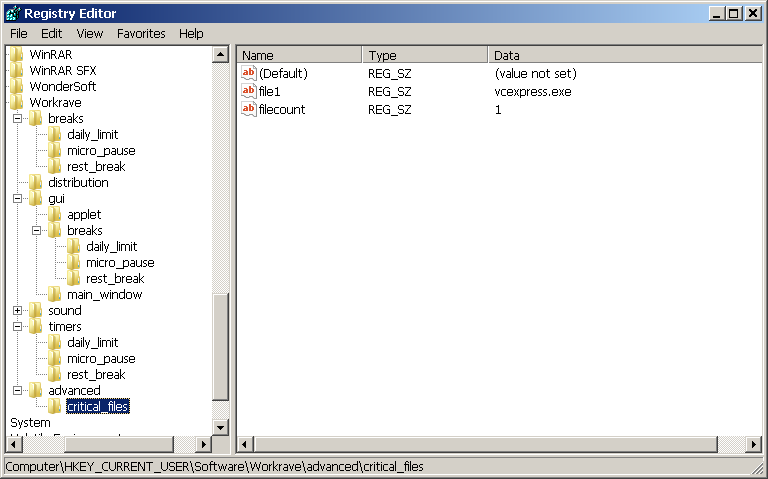 | |||
| Ray Satiro | Jan 13 2009 06:12:36 UTC | 40245 | image/png | |
| 166 | Critical files registry entry | |||
| Ray Satiro | Jan 13 2009 06:15:27 UTC | 296 | application/octet-stream | |
| Who | When | What | Removed | Added |
|---|---|---|---|---|
| Ray Satiro | Jan 13 2009 06:12:36 UTC | status | NEW | ASSIGNED |
| assigned_to | Rob Caelers | Ray Satiro | ||
| Ray Satiro | Jan 13 2009 06:16:35 UTC | status | ASSIGNED | RESOLVED |
| resolution | WONTFIX |
Description
Matthew Henry Apr 21 2008 03:47:22 UTC
Thanks for making WorkRave and making it free.  I switched from an RSI program that I actually paid for because I like WR better.  One feature would make it perfect: an application exclusion list.

Yes, I know it's bad for my wrists, but if I'm playing Painkiller and the Workrave dialog pops up distracting me and suddenly I'm being shot in the face, it's mighty annoying.  Sure I could remember to disable WR before I start a game, but this never happens.

It's be awesome if there was an application exclusion list.  So I could enter "Painkiller" and "Dora the Explorer" and neither my son nor I would see Workrave dialogs while either of those apps were the active application.
Comment 1
Ray Satiro Jan 13 2009 06:12:36 UTC
Created attachment 165
Critical files list

Hello,

You can exclude applications from having their input blocked by Workrave. However this is mostly for emergencies. For example, by default taskmgr.exe is excluded. If Workrave malfunctions, the user can access Task Manager and terminate it.

You can add your own applications to the exclusion list. However, this will not have the desired behavior of the applications appearing above Workrave. What you are asking for defeats the point of Workrave. It is meant to stay on top of all other applications. The idea is the user is not supposed to use the computer during their break.

If you have technical expertise and you need to add an application to the critical list, you can do so. Please do not attempt to do this otherwise. I am going to attach a file called critical.reg and tell you how to modify it.
Comment 2
Ray Satiro Jan 13 2009 06:15:27 UTC
Created attachment 166
Critical files registry entry

You can edit the attached critical.reg and change "vcexpress.exe" to the name of whatever application it is that you want excluded. Make sure the application name is all lowercase.