Bug 656 - Strange mouse distances
Status:
RESOLVED FIXED
Component:
Core :: Win32
Version:
1.8.4
Hardware:
PC Windows XP
Importance:
P4 major
Target Milestone:
---
Assignee:
Raymond Penners
URL:
Depends on:
Blocks:
Reported:
Jul 26 2007 10:22:52 UTC
by:
Patrick Z
Modified:
Jan 30 2008 19:17:26 UTC
CC List:
Nick de Vos
calvin
Ray Satiro
| Id | Who | When | Size | Type |
|---|---|---|---|---|
| 99 | Screencapture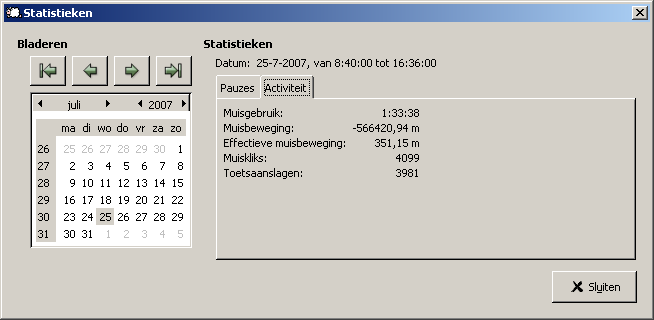 | |||
| Patrick Z | Jul 26 2007 10:23:56 UTC | 14407 | image/png | |
| 104 | Mouse distance normal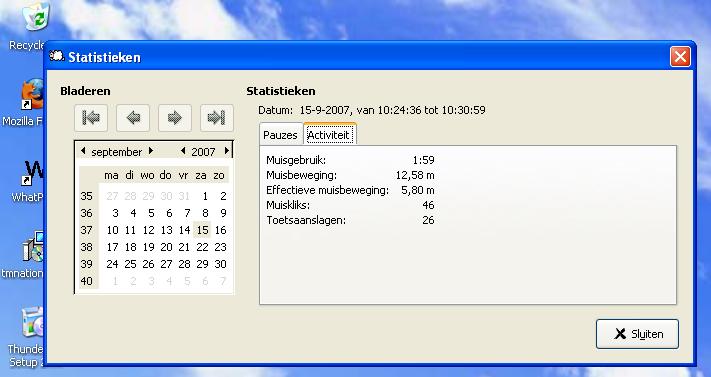 | |||
| Nick de Vos | Sep 15 2007 11:25:39 UTC | 41670 | image/jpeg | |
| 105 | Mouse distance after trying to move over left edge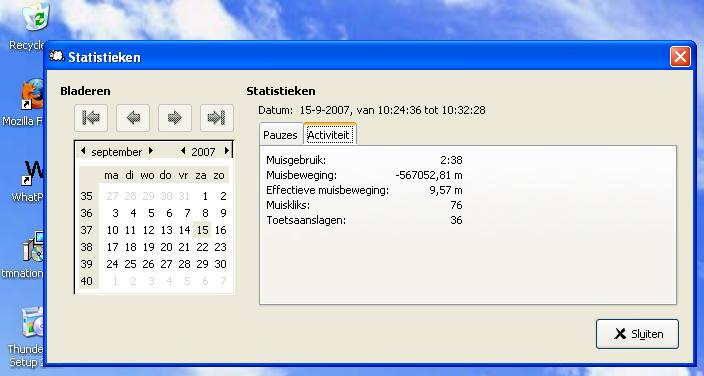 | |||
| Nick de Vos | Sep 15 2007 11:26:19 UTC | 41345 | image/jpeg | |
| 106 | Mouse distance after trying to move over the upper edge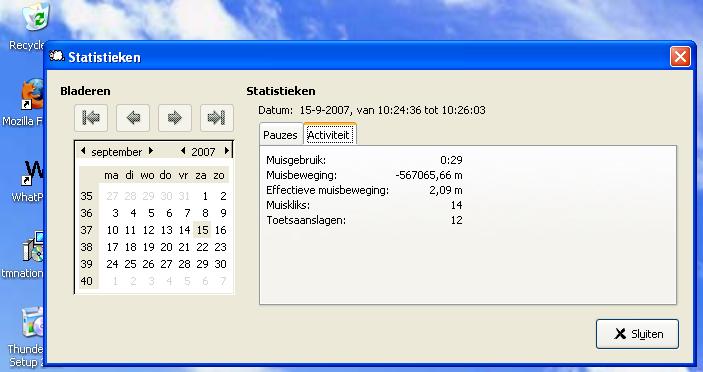 | |||
| Nick de Vos | Sep 15 2007 11:26:40 UTC | 41351 | image/jpeg | |
| Who | When | What | Removed | Added |
|---|---|---|---|---|
| Rob Caelers | Aug 27 2007 14:04:10 UTC | priority | P2 | P4 |
| Nick de Vos | Sep 12 2007 20:31:07 UTC | cc | Nick de Vos | |
| Ray Satiro | Sep 14 2007 23:59:00 UTC | cc | Ray Satiro | |
| Ray Satiro | Sep 19 2007 22:42:18 UTC | status | NEW | RESOLVED |
| resolution | FIXED | |||
| Rob Caelers | Jan 30 2008 19:17:26 UTC | cc | calvin |
Description
Patrick Z Jul 26 2007 10:22:52 UTC
On some days in te statistics screen large negative ditances appear for the mouse.
Comment 1
Patrick Z Jul 26 2007 10:23:56 UTC
Created attachment 99
Screencapture
Comment 2
Nick de Vos Sep 12 2007 19:33:33 UTC
I got this problem too and I found a way to reproduce it (on Windows XP).

Open your statistics screen.
Position the mouse either to the left edge or the upper edge of the screen and see the mouse distance freak out.

Maybe some bug when the x or y coordinates of your mouse are zero?

When you move away from the edges the distance returns to normal after about a second.
Comment 3
Ray Satiro Sep 14 2007 23:59:00 UTC
I can't reproduce. I'll look into it though. The distance shouldn't be negative.

If you have more information please let us know. Some before/after numbers could help. Thanks!
Comment 4
Nick de Vos Sep 15 2007 11:23:46 UTC
I looked further in to it.

When I move slowly with my mousepointer to the left edge, and stop exactly at the edge, the distance stay normal. But when I try to move my mouse further to the left (which is impossible because its already at the edge of the screen), the distance gets negative.

The same story goes for moving the mouse to the upper edge.

I got some screencaptures of the distances.

Here some values of a wrong distance and a valid distance recorded directly after eachother:
Valid: 65,82
Invalid: -567004,08

Valid: 70,73
Invalid: -566999,17

At least they are consistent: Valid + Abs(Invalid) = 567069,9

System:
Windows XP (SP2)
screenresolution: 1280 x 1024
single monitor setup

This is another system then the one in comment #2

Both systems run workrave 1.8.4
Comment 5
Nick de Vos Sep 15 2007 11:25:39 UTC
Created attachment 104
Mouse distance normal
Comment 6
Nick de Vos Sep 15 2007 11:26:19 UTC
Created attachment 105
Mouse distance after trying to move over left edge
Comment 7
Nick de Vos Sep 15 2007 11:26:40 UTC
Created attachment 106
Mouse distance after trying to move over the upper edge
Comment 8
Ray Satiro Sep 17 2007 22:13:04 UTC
confirmed on xp, vista.

x : y

134 : 93
144 : 74
157 : 55
175 : 30
199 : 65534
225 : 65499
250 : 65499
272 : 65501
294 : 65500
310 : 65510
325 : 65515
338 : 65515
348 : 65517
356 : 65522
360 : 65528
363 : 65529
364 : 65532
364 : 65534
364 : 65533
364 : 65535
364 : 1
364 : 2
364 : 3
364 : 4
Comment 9
Ray Satiro Sep 18 2007 22:47:31 UTC
I cannot reproduce this bug in Workrave 1.8.5 on Windows XP, although it does still exist on other platforms.

A patch has been submitted to fix this bug on all platforms. The nightly builds for 1.8.6 in future weeks will contain the patch.

Thanks to both of you for submitting your reports, and thanks to Nick for the extra information.

--

Please try Workrave 1.8.5, and tell us if you experience the same problem.

http://superb-west.dl.sourceforge.net/sourceforge/workrave/workrave-win32-1.8.5-installer.exe
1b732b368fae346712f55c013fd86e93 *workrave-win32-1.8.5-installer.exe

Thanks,

Ray
Comment 10
Nick de Vos Sep 19 2007 21:07:20 UTC
Workrave 1.8.5 works fine!
Comment 11
Rob Caelers Jan 30 2008 19:17:26 UTC
*** Bug 707 has been marked as a duplicate of this bug. ***