Bug 653 - Tray icon has opaque background
Status:
RESOLVED FIXED
Component:
Core :: UNIX
Version:
1.8.4
Hardware:
PC Linux
Importance:
P4 minor
Target Milestone:
---
Assignee:
Ray Satiro
URL:
Depends on:
Blocks:
Reported:
Jul 14 2007 03:40:06 UTC
by:
Andre Offringa
Modified:
Mar 11 2008 00:34:22 UTC
CC List:
Andre Offringa
Francois Marier
Ray Satiro
| Id | Who | When | Size | Type |
|---|---|---|---|---|
| 107 | Tray icons with opaque workrave icon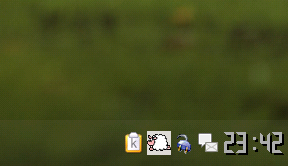 | |||
| Andre Offringa | Sep 18 2007 23:49:32 UTC | 27554 | image/png | |
| 108 | transparency test | |||
| Ray Satiro | Sep 19 2007 04:13:44 UTC | 508 | image/png | |
| 109 | pidgin-2.2.0\pidgin\pixmaps\tray\22 | |||
| Ray Satiro | Sep 19 2007 22:32:51 UTC | 808 | image/png | |
| 110 | Tray icon of workrave when replaced with Pidgin icons.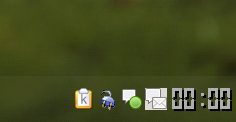 | |||
| Andre Offringa | Sep 20 2007 00:03:04 UTC | 17687 | image/png | |
| 111 | capture | |||
| Ray Satiro | Sep 20 2007 06:07:29 UTC | 3943 | image/png | |
| Who | When | What | Removed | Added |
|---|---|---|---|---|
| Rob Caelers | Aug 27 2007 14:04:10 UTC | priority | P2 | P4 |
| Ray Satiro | Sep 18 2007 22:35:53 UTC | cc | Ray Satiro | |
| Ray Satiro | Sep 20 2007 06:07:29 UTC | status | NEW | ASSIGNED |
| assigned_to | Rob Caelers | Ray Satiro | ||
| Francois Marier | Nov 7 2007 03:15:58 UTC | cc | Francois Marier | |
| Rob Caelers | Mar 11 2008 00:34:22 UTC | status | ASSIGNED | RESOLVED |
| resolution | FIXED |
Description
Andre Offringa Jul 14 2007 03:40:06 UTC
The background of workrave's tray icon is opaque (the background around the sheep). If the traybar is not the same color as the background, the icon looks kind of ugly. It would be nice if the background would be transparent.
Comment 1
Ray Satiro Sep 18 2007 22:35:53 UTC
I don't notice that on debian etch or windows xp. Would it be possible for you to take a screenshot of just your panel (no private info) and add it to this report? also more detailed os / window manager info please
Comment 2
Andre Offringa Sep 18 2007 23:49:32 UTC
Created attachment 107
Tray icons with opaque workrave icon
Comment 3
Andre Offringa Sep 18 2007 23:53:04 UTC
I've attached a partial screenshot. I use KDE from Debian testing. I've configured the traybar to be 'half' transparent as you can see on the screenshot. The other icons (clipboard, laptop status and Pidgin) show up transparent but Workrave does not.
Comment 4
Ray Satiro Sep 19 2007 04:13:44 UTC
Created attachment 108
transparency test

hm that's weird.

I made a minor modification to the sheep tray icon. The black border is now slightly lighter. I then set the transparent color full black. This, however, is not very different from the current png. I then opened in irfanview v4 and saved it using the included pngout plugin.

So please try it out. If you can, take a screenshot regardless of whether or not it's transparent. That information will help us revise the png if necessary.

cd /usr/share/workrave/images
mv workrave-icon-medium.png workrave-icon-medium.bak.png
mv $yourdldir/workrave-icon-medium.png .
Comment 5
Andre Offringa Sep 19 2007 08:21:41 UTC
(In reply to comment #4)
> I made a minor modification to the sheep tray icon. The black border is now
> slightly lighter. I then set the transparent color full black. This, however,
> is not very different from the current png. I then opened in irfanview v4 and
> saved it using the included pngout plugin.
>
> So please try it out. If you can, take a screenshot regardless of whether or
> not it's transparent. That information will help us revise the png if
> necessary.

Thanks for answering. I did as you said, then restarted Workrave and by lack of changes my whole computer, but nothing changed - it still looks the same :(.
Comment 6
Ray Satiro Sep 19 2007 22:32:51 UTC
Created attachment 109
pidgin-2.2.0\pidgin\pixmaps\tray\22

Hi,

In StatusIcon.cc the normal workrave status tray icon is workrave-icon-large.png @ 32x32. I thought that the 24x24 medium sheep icon was used for the tray, but I was wrong. The tray does use other 24x24 icons when the status is quiet or suspended.

Try setting Workrave to quiet, and then suspended. Are either of those tray icons transparent?

Set Workrave back to normal mode and exit. Replace workrave-icon-large.png with the icon I uploaded yesterday, and restart. Is the icon transparent now?

If that doesn't work, please try this:
Pidgin has a 22x22 transparent tray icon, tray-message.png (attached). Use it to temporarily replace workrave-icon-large.png. If the Pidgin icon isn't transparent when used by Workrave, there could be some issue with how the icon is placed.

Either way, please send a shot of the tray. Thanks!
Comment 7
Andre Offringa Sep 20 2007 00:03:04 UTC
Created attachment 110
Tray icon of workrave when replaced with Pidgin icons.
Comment 8
Andre Offringa Sep 20 2007 00:06:38 UTC
(In reply to comment #6)
> Try setting Workrave to quiet, and then suspended. Are either of those tray
> icons transparent?

Nope

> Set Workrave back to normal mode and exit. Replace workrave-icon-large.png with
> the icon I uploaded yesterday, and restart. Is the icon transparent now?

Nope, sorry

> If that doesn't work, please try this:
> Pidgin has a 22x22 transparent tray icon, tray-message.png (attached). Use it
> to temporarily replace workrave-icon-large.png. If the Pidgin icon isn't
> transparent when used by Workrave, there could be some issue with how the icon
> is placed.

I guess that is the case... See my screenshot for how it is shown now. The icon on the right is workrave (the picture next to workrave is ofcourse the real Pidgin process).
Comment 9
Andre Offringa Sep 20 2007 00:08:56 UTC
BTW.. workrave-icon-medium.png is the image that is normally shown at my tray, not the large version.
Comment 10
Ray Satiro Sep 20 2007 06:07:29 UTC
Created attachment 111
capture

We'll look into this, thanks.
Comment 11
Francois Marier Nov 7 2007 03:15:58 UTC
*** Bug 693 has been marked as a duplicate of this bug. ***
Comment 12
Rob Caelers Mar 11 2008 00:34:22 UTC
Fixed.

The workrave-icon is put into an event box. This is needed to get tooltips when hovering above the icon. This event box was causing the transparency problems. Setting the 'visible-window' property of the eventbox to false solved the problem.