Bug 647 - Applet doesn't show on Vista
Status:
RESOLVED FIXED
Component:
GUI
Version:
1.8.4
Hardware:
PC Windows Vista
Importance:
P4 minor
Target Milestone:
---
Assignee:
Ray Satiro
URL:
Depends on:
Blocks:
Reported:
Jul 1 2007 10:59:13 UTC
by:
Carlo de Wolf
Modified:
Mar 12 2009 05:13:44 UTC
CC List:
Gerrit-Jan Gommer
Marcin Zajaczkowski
Ray Satiro
| Id | Who | When | Size | Type |
|---|---|---|---|---|
| 88 | Taskbar menu open on Toolbars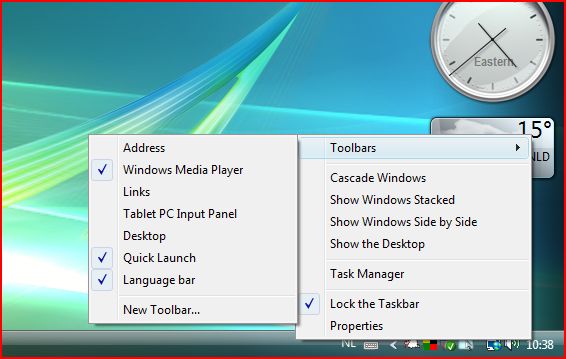 | |||
| Carlo de Wolf | Jul 5 2007 10:43:15 UTC | 45130 | image/jpeg | |
| 90 | workrave-applet.dll registration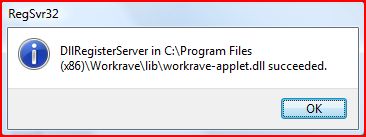 | |||
| Carlo de Wolf | Jul 20 2007 14:50:42 UTC | 18581 | image/jpeg | |
| 91 | Windows Explorer - DEP restart on applet install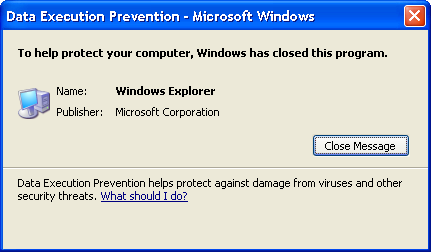 | |||
| Ray Satiro | Jul 20 2007 19:18:58 UTC | 13183 | image/png | |
| 92 | Unregister workrave-applet.dll in system32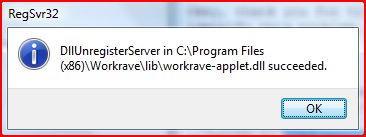 | |||
| Carlo de Wolf | Jul 21 2007 16:31:19 UTC | 11641 | image/jpeg | |
| 93 | Register workrave-applet.dll in SysWOW64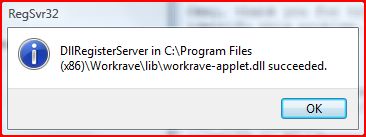 | |||
| Carlo de Wolf | Jul 21 2007 16:33:25 UTC | 18477 | image/jpeg | |
| 94 | Shell extensions | |||
| Carlo de Wolf | Jul 24 2007 09:14:53 UTC | 37864 | application/octet-stream | |
| 95 | Workrave Wow6432Node | |||
| Carlo de Wolf | Jul 24 2007 09:15:23 UTC | 232 | application/octet-stream | |
| 96 | Workrave applet instance 1 | |||
| Carlo de Wolf | Jul 24 2007 09:15:49 UTC | 1140 | application/octet-stream | |
| 97 | Workrave applet instance 2 | |||
| Carlo de Wolf | Jul 24 2007 09:16:00 UTC | 1284 | application/octet-stream | |
| 98 | Workrave applet instance 3 | |||
| Carlo de Wolf | Jul 24 2007 09:16:12 UTC | 1284 | application/octet-stream | |
| 114 | 69af73ad3ec2ab11e3a2e9c92d2e9316 *workrave-applet.dll | |||
| Ray Satiro | Sep 30 2007 22:08:04 UTC | 103936 | application/octet-stream | |
| 116 | Workrave x64 applet in Toolbar | |||
| Carlo de Wolf | Oct 4 2007 17:11:03 UTC | 13635 | image/jpeg | |
| 181 | Workrave on Server 2008 x64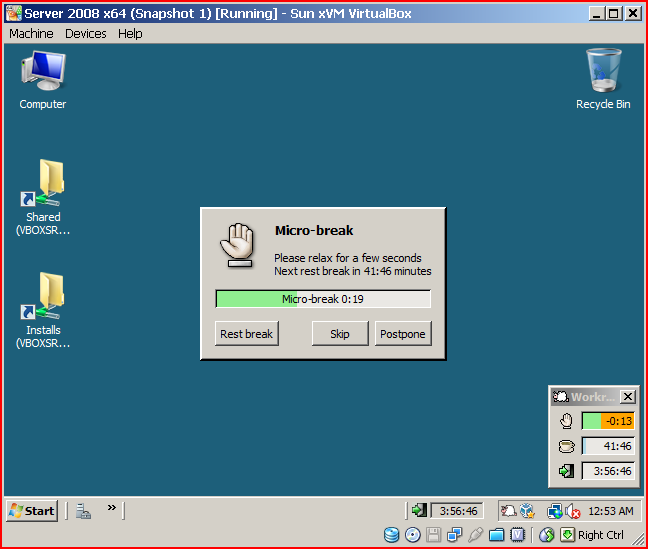 | |||
| Ray Satiro | Mar 12 2009 05:13:06 UTC | 59037 | image/png | |
| Who | When | What | Removed | Added |
|---|---|---|---|---|
| Ray Satiro | Jul 8 2007 22:45:19 UTC | cc | Ray Satiro | |
| Carlo de Wolf | Jul 24 2007 09:16:47 UTC | attachments.mimetype | application/octet-stream | text/plain |
| Carlo de Wolf | Jul 24 2007 09:17:18 UTC | attachments.mimetype | text/plain | application/octect-stream |
| Carlo de Wolf | Jul 24 2007 09:17:30 UTC | attachments.mimetype | application/octect-stream | application/octet-stream |
| Rob Caelers | Aug 27 2007 14:04:09 UTC | priority | P2 | P4 |
| Ray Satiro | Sep 29 2007 03:44:57 UTC | assigned_to | Rob Caelers | Ray Satiro |
| Ray Satiro | Oct 4 2007 19:14:07 UTC | status | NEW | ASSIGNED |
| Gerrit-Jan Gommer | Jun 9 2008 10:59:45 UTC | cc | Gerrit-Jan Gommer | |
| Marcin Zajaczkowski | Nov 27 2008 21:50:03 UTC | cc | Marcin Zajaczkowski | |
| Ray Satiro | Mar 12 2009 05:13:44 UTC | status | ASSIGNED | RESOLVED |
| resolution | FIXED |
Description
Carlo de Wolf Jul 1 2007 10:59:13 UTC
Irregardless of the settings in the user interface preferences, the applet doesn't show up at all.
Comment 1
Ray Satiro Jul 1 2007 23:19:36 UTC
Did you reboot after install?
Comment 2
Carlo de Wolf Jul 2 2007 12:05:41 UTC
Yes.
Comment 3
Rob Caelers Jul 2 2007 15:10:32 UTC
Ok. let's go back one step.

Did you have administrator rights when installing Workrave? (needed to register the applet)

Did you add the applet in the taskbar? Right click on taskbar, select tools, then workrave?
Comment 4
Carlo de Wolf Jul 5 2007 10:43:15 UTC
Created attachment 88
Taskbar menu open on Toolbars

To be sure, I've reinstalled as administrator.

There is no option in the taskbar menu to enable the Workrave applet. (see picture)
Comment 5
Ray Satiro Jul 12 2007 06:04:11 UTC
Does AVG guard your registry? Please run a command prompt as admin. Switch to your desktop directory and run this command:

regedit /e applet.txt HKEY_CLASSES_ROOT\CLSID\{B6407CFF-FCB5-4883-90D2-3B4E7B2756BF}
^^^all one line, no spaces in registry key

In your reply please comment on where Workrave is installed and attach applet.txt, thanks
Comment 6
Carlo de Wolf Jul 19 2007 17:29:21 UTC
The key you requested doesn't not exist in the registry. What's the human readable name of this component?

Workrave is installed on its default location in C:\Program Files (x86)\Workrave.
Comment 7
Ray Satiro Jul 19 2007 20:44:52 UTC
Carlo,

Could you comment on the type of hardware you're using? Are you using Vista x64? Please help us troubleshoot this.

Please do exactly the following, all steps equally important:

Run a command window as administrator
Switch to directory c:\windows\system32
Run this command:
regsvr32 "C:\Program Files (x86)\Workrave\lib\workrave-applet.dll"

Please note whatever message you see. Also, if you can, use the snipping tool to create a screenshot of any error messagebox. Possible messages I know of:
---
workrave-applet.dll is not an executable file and no registration helper is registered for this file type.
---
The module workrave-applet.dll may not compatible with the version of Windows that you're running. Check if the module is compatible with an x86 (32-bit) or x64 (64-bit) version of regsvr32.exe
---

If there is an error message, please do the following in the same command window:

Switch to directory c:\windows\syswow64
Run this command:
regsvr32 "C:\Program Files (x86)\Workrave\lib\workrave-applet.dll"

Please note whatever message you see.


On Vista x64 \windows\system32\regsvr32 is actually a 64-bit version. The 32-bit regsvr32 is located \windows\syswow64\regsvr32.
more information: http://support.microsoft.com/kb/282747

Please let us know if this works for you.
Comment 8
Carlo de Wolf Jul 20 2007 14:50:42 UTC
Created attachment 90
workrave-applet.dll registration

I'm using Vista x64 Business edition.
AMD Athlon-64 FX-62 Dual Core 2.80Ghz
4GB RAM
Nvidia 8800-GTX (SLI) (drivers tried: 158.24, 158.45, 162.22 & 163.11)

I ran regsvr32 from c:\windows\system32 (see attachment for result).
No positive effect on Workrave though.
Comment 9
Ray Satiro Jul 20 2007 19:18:58 UTC
Created attachment 91
Windows Explorer - DEP restart on applet install
Comment 10
Ray Satiro Jul 20 2007 19:23:12 UTC
(In reply to comment #8)
> I ran regsvr32 from c:\windows\system32 (see attachment for result).
> No positive effect on Workrave though.
>

Okay, thank you for trying that. The information you are giving will help identify this problem. Would you please try this:

Exit Workrave.

Run a command window as administrator
Switch to directory c:\windows\system32
Run this command:
regsvr32 /u "C:\Program Files (x86)\Workrave\lib\workrave-applet.dll"
Note any error with snipping tool.
-Close the messagebox and wait 10 seconds.

Switch to directory c:\windows\syswow64
Run this command:
regsvr32 "C:\Program Files (x86)\Workrave\lib\workrave-applet.dll"
Note any error with snipping tool.
-Close the messagebox and wait 10 seconds.

If successful and Workrave still does not appear on the taskbar, please:
right-click taskbar > Toolbars and check for 'Workrave' but do _not_ select it.

If 'Workrave' is listed, please reboot and then select the 'Workrave' toolbar. You can try without a reboot, but you might see a Data Execution Prevention message similar to the screenshot I've attached to this report.


Thanks,

Ray
Comment 11
Carlo de Wolf Jul 21 2007 16:31:19 UTC
Created attachment 92
Unregister workrave-applet.dll in system32
Comment 12
Carlo de Wolf Jul 21 2007 16:33:25 UTC
Created attachment 93
Register workrave-applet.dll in SysWOW64

Unregistration of the workrave-applet.dll worked without any problem.
Registration in SysWOW64 worked, but it didn't give any change in the Toolbars menu. Neither was there a Workrave selection in the Toolbars menu after a reboot.
Comment 13
Ray Satiro Jul 22 2007 05:44:37 UTC
Thanks for trying that. I don't have Vista x64 so I can't reproduce. I'm thinking this might be a problem with x64. I will look into this. If you want to help rule out some things:

Please make a checksum list of your workrave directory. There is a program called md5summer that is pretty intuitive:
http://www.md5summer.org/md5v12011.zip
C:\Program Files (x86)\Workrave > OK > Select all > add > OK

Open regedit, select HKEY_CLASSES_ROOT and search for workrave-applet.dll. If you find anything please export.

Also, do you think it's possible your AVG settings are preventing Workrave's applet from being registered? And are you using ie7?
Comment 14
Carlo de Wolf Jul 24 2007 09:14:53 UTC
Created attachment 94
Shell extensions
Comment 15
Carlo de Wolf Jul 24 2007 09:15:23 UTC
Created attachment 95
Workrave Wow6432Node
Comment 16
Carlo de Wolf Jul 24 2007 09:15:49 UTC
Created attachment 96
Workrave applet instance 1
Comment 17
Carlo de Wolf Jul 24 2007 09:16:00 UTC
Created attachment 97
Workrave applet instance 2
Comment 18
Carlo de Wolf Jul 24 2007 09:16:12 UTC
Created attachment 98
Workrave applet instance 3
Comment 19
Ray Satiro Jul 25 2007 00:07:31 UTC
Hi,

Thank you for that information. I don't have any more suggestions, until myself or someone else can test with Vista x64.

I did come across another MS article, but I don't know if it applies to Vista.

Menu bar/Toolbar Missing in Windows Explorer and/or Internet Explorer
http://support.microsoft.com/kb/555130
Comment 20
Ray Satiro Sep 29 2007 03:44:57 UTC
Confirmed on Windows Server 2003 x64
Comment 21
Ray Satiro Sep 30 2007 22:08:04 UTC
Created attachment 114
69af73ad3ec2ab11e3a2e9c92d2e9316 *workrave-applet.dll

Carlo,

Attached is an experimental* 64-bit workrave-applet.dll that is working on Windows Server 2003 x64. Can you help test? We could really use your feedback.


First, unregister the 32-bit applet:

%SystemRoot%\SysWOW64\regsvr32 /u "C:\Program Files (x86)\Workrave\lib\workrave-applet.dll"


Second, replace workrave-applet.dll with the attached.


Third, register the 64-bit applet:

%SystemRoot%\system32\regsvr32 "C:\Program Files (x86)\Workrave\lib\workrave-applet.dll"


Fourth, wait a few seconds... then try to enable the Workrave toolbar.


*With this experimental build, when you right-click on the applet you will not see Workrave menu items (if you do, let me know). To access the menu please right-click on the Workrave icon in your system tray instead.


Thanks,

Ray
Comment 22
Carlo de Wolf Oct 4 2007 17:11:03 UTC
Created attachment 116
Workrave x64 applet in Toolbar

Although the applet appears and switches between hand and cup, the timers are not shown.
Comment 23
Carlo de Wolf Oct 4 2007 17:53:13 UTC
It also disables Aero on the toolbar.
Comment 24
Ray Satiro Oct 4 2007 19:14:07 UTC
(In reply to comment #22)
> Created an attachment (id=116) [details]
> Workrave x64 applet in Toolbar
> Although the applet appears and switches between hand and cup, the timers are
> not shown.

If you disable taskbar lock, and then size the applet, do you see the timers? Also, after the taskbar is unlocked, see if you can deselect "Show title".

(In reply to comment #23)
> It also disables Aero on the toolbar.

Could you show me what you mean by that? The only x64 OS I have to test with is Windows Server 2003 x64.

Thanks
Comment 25
Carlo de Wolf Oct 12 2007 08:39:08 UTC
(In reply to comment #24)
> If you disable taskbar lock, and then size the applet, do you see the timers?
> Also, after the taskbar is unlocked, see if you can deselect "Show title".

Yes. Although it defaults back to the previous state when I disable and re-enable the toolbar (trivial).

> (In reply to comment #23)
> > It also disables Aero on the toolbar.
>
> Could you show me what you mean by that? The only x64 OS I have to test with is
> Windows Server 2003 x64.

You can see the difference in my first attachment (http://issues.workrave.org/cgi-bin/bugzilla/attachment.cgi?id=88) vs the Workrave x64 applet in Toolbar (http://issues.workrave.org/cgi-bin/bugzilla/attachment.cgi?id=116). The toolbar itself is no longer transparent (the horror, the horror). I say new bug, let's now tie it to this one.

Note that the applet active setting in the user preferences is ignored. This could be moved to a new bug as well.
Comment 26
Ray Satiro Oct 13 2007 00:13:37 UTC
(In reply to comment #25)
> Although it defaults back to the previous state when I disable and
> re-enable the toolbar (trivial).

OK.

> The
> toolbar itself is no longer transparent (the horror, the horror). I say new
> bug, let's now tie it to this one.

Reported as bug #688

> Note that the applet active setting in the user preferences is ignored. This
> could be moved to a new bug as well.

Disable "Applet enabled" to disable applet timers, not to remove the applet from your taskbar. You should see a Workrave sheep in place of where the timers are.

The preference could be misinterpreted. I'll bring it up with one of the developers.
Comment 27
Carlo de Wolf Oct 13 2007 08:20:23 UTC
(In reply to comment #26)
> > Note that the applet active setting in the user preferences is ignored. This
> > could be moved to a new bug as well.
>
> Disable "Applet enabled" to disable applet timers, not to remove the applet
> from your taskbar. You should see a Workrave sheep in place of where the timers
> are.

I was being impatient, it takes about 2 seconds for the timers to disappear or re-appear.
Comment 28
Ray Satiro Oct 14 2007 05:57:47 UTC
(In reply to comment #27)
> I was being impatient, it takes about 2 seconds for the timers to disappear or
> re-appear.


Ok :)

I submitted a patch to fix the Workrave menu not appearing on applet right-click. After I fix bug #688 I'll upload a new applet x64 build.
Comment 29
Gerrit-Jan Gommer Jun 9 2008 10:59:45 UTC
I can confirm that this problem exist also on PC's with Windows XPx64. For the rest Workrave works fine, so I'll wait for a final x64 patch or a new release with this bug fixed.
Comment 30
Ray Satiro Jun 9 2008 17:29:18 UTC
Hi,

My momentum kind of died trying to fix bug #688, and I had a number of problems when building for multiple targets in VS. I'm trying to make singular multi-platform x64 DLLs. #688 doesn't apply to 64-bit XP, so for now if you want you can try the DLL attached to this thread.

I'm going to finalize the x64 DLLs so that we can wrap all the x64 stuff into the next release. Another hurdle is fixing the installer to properly install for x64. I don't use Windows x64 often, and I don't think Rob does either, so this probably won't happen right away, sorry.
Comment 31
Ray Satiro Mar 12 2009 05:13:06 UTC
Created attachment 181
Workrave on Server 2008 x64

1.9.0 installs 64-bit applet on x64 OS. Not sure why I left this open. Closing