Bug 587 - Vista: Workrave not modal / coming to front
Status:
RESOLVED FIXED
Component:
Core :: Win32
Version:
0.1.0
Hardware:
PC Windows Vista
Importance:
P4 major
Target Milestone:
---
Assignee:
Ray Satiro
URL:
Depends on:
Blocks:
Reported:
Jan 30 2007 10:59:22 UTC
by:
Sander Goudswaard
Modified:
May 13 2009 03:28:10 UTC
CC List:
Marcin Zajaczkowski
Ray Satiro
Scott McDermott
Jeroen van Onzen
wouter
| Id | Who | When | Size | Type |
|---|---|---|---|---|
| 125 | Process Explorer column info for DLLs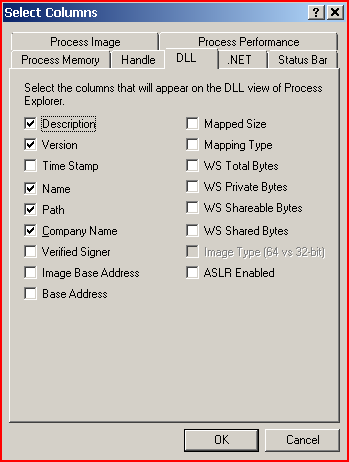 | |||
| Ray Satiro | Feb 27 2008 18:59:59 UTC | 13892 | image/png | |
| 126 | Windows Vista x64 log-file | |||
| Jeroen van Onzen | Feb 28 2008 09:30:03 UTC | 9328 | text/plain | |
| 142 | gdkWindowTemp pop under fixed midway | |||
| Ray Satiro | Aug 21 2008 02:56:18 UTC | 49896 | text/plain | |
| Who | When | What | Removed | Added |
|---|---|---|---|---|
| Ray Satiro | Mar 25 2007 20:07:00 UTC | cc | Ray Satiro | |
| Rob Caelers | Aug 27 2007 14:04:03 UTC | priority | P2 | P4 |
| Ray Satiro | Sep 19 2007 23:19:39 UTC | assigned_to | Raymond Penners | Ray Satiro |
| Sander Goudswaard | Sep 20 2007 23:14:07 UTC | status | NEW | RESOLVED |
| resolution | FIXED | |||
| version | 1.8.3 | 0.1.0 | ||
| Jeroen van Onzen | Feb 27 2008 12:30:37 UTC | cc | Jeroen van Onzen | |
| Ray Satiro | Mar 2 2008 04:27:08 UTC | status | RESOLVED | REOPENED |
| resolution | FIXED | |||
| Ray Satiro | Jun 24 2008 05:53:45 UTC | cc | Scott McDermott | |
| wouter | Aug 20 2008 12:03:29 UTC | cc | wouter | |
| Marcin Zajaczkowski | Nov 27 2008 21:49:55 UTC | cc | Marcin Zajaczkowski | |
| Ray Satiro | May 13 2009 03:28:10 UTC | status | REOPENED | RESOLVED |
| resolution | FIXED |
Description
Sander Goudswaard Jan 30 2007 10:59:22 UTC
On Windows Vista, Workrave does not always come to the front. This means users hear the sound of them needing some kind of break, but do not get alerted properly.
When a forced break occurs, the keyboard is blocked, but users cannot access the 'postpone' or 'skip' buttons since these are behind other windows.
Comment 1
Ray Satiro Mar 25 2007 20:07:00 UTC
I have that problem also. You can minimize the active window from your taskbar (right-click & minimize). Sometimes you will find Workrave hiding behind it. That doesn't always work though, I'm guessing because the screen is supposed to be locked.
Comment 2
Ray Satiro Apr 7 2007 05:26:21 UTC
I am now running 20070404, but I have the same problem. I have been able to work around it with the right-click>minimize, but that doesn't work when I'm using a full-screen remote desktop. Do you think this could be solved with SetForegroundWindow on keydown?
Comment 3
Ray Satiro Sep 19 2007 23:19:39 UTC
The break warning not coming to the front should be fixed in 1.8.5
The break window comes to the front in all my recent testing.

Please try 1.8.5
If the break window still doesn't come to the front, there is an undocumented feature you can use to force the focus on it, "popping" it to the top (hopefully).

Also, you can CTRL+ALT+DEL to start taskmgr and end task on Workrave 1.8.5 if it locks up on you.

It's important that you let us know if you still have this problem with 1.8.5

--

Please try Workrave 1.8.5, and tell us if you experience the same problem.

http://superb-west.dl.sourceforge.net/sourceforge/workrave/workrave-win32-1.8.5-installer.exe
1b732b368fae346712f55c013fd86e93 *workrave-win32-1.8.5-installer.exe

Thanks,

Ray
Comment 4
Sander Goudswaard Sep 20 2007 23:14:07 UTC
This seems to be fixed in 1.8.5. There are some other Vista issues now but that needs a new bug: color of selected item in menus is white-on-white, and when right clicking the toolbar item and selecting a Workrave menu option does not result in a dialog to be opened.
Comment 5
Ray Satiro Sep 21 2007 05:31:25 UTC
Workrave menu selection doesn't work? I just installed 1.8.5, and the menu works for me. Is that a problem all the time or intermittent? If you could click "About..." to see if you're running 1.8.5... if you can't let me know.

The combobox issue we know about, filed as bug #580. Working on that.


If you see the break or warning window pop under again let us know by adding another comment here. That has been a pita to trace. It's probably a bug in gtk and not in workrave.
Comment 6
Jeroen van Onzen Feb 27 2008 12:30:37 UTC
Hi guys,

I am running Windows Vista x64 here, and I have the same problem here with version 1.8.5. I don't know how I can give you more detailed information, except it looks like it mostly occurs in Visual Studio (2008).

If you need any more information, please feel free to contact me. I added myself as a cc to this list.
Comment 7
Ray Satiro Feb 27 2008 18:59:59 UTC
Created attachment 125
Process Explorer column info for DLLs

Thank you for your report, we can definitely use your help. The fix in Workrave 1.8.5 is really more of a hack. We believe the cause of the problem is in the GTK libs. I would like to check your GTK libs. Please download Microsoft's Sysinternals Suite of tools.

http://technet.microsoft.com/en-us/sysinternals/0e18b180-9b7a-4c49-8120-c47c5a693683.aspx
069307146086d91b7ccf154cb0cd57a9  SysinternalsSuite 2-26-2008.zip
The files are digitally signed by Microsoft.

Run Process Explorer (procexp.exe). You will need admin privileges.
File > Show Details for All Processes

View > Select Columns... > DLL Tab
Make sure the following attributes are selected:
Description, Version, Name, Path, Company Name

Select the Workrave.exe process and press CTRL + D. The lower pane will open with a list of DLLs. Press CTRL + A to save the data to something like workrave.exe.txt.

Open the data file in notepad or something similar. You can delete the first half of the information because it contains what you may consider private information ( a list of your processes ). Delete from the beginning until you reach this point:
"Process: Workrave.exe Pid: XXXX"
everything below that is workrave DLL info, and that's what I want. Please upload that file to this thread.

Thanks,

Ray
Comment 8
Jeroen van Onzen Feb 28 2008 09:30:03 UTC
Created attachment 126
Windows Vista x64 log-file

As requested. Please note that the solution sometimes works and this is a multiprocessor 64-bit machine.
Comment 9
Ray Satiro Mar 2 2008 04:27:08 UTC
Jeroen ,

The GTK libs loaded by your Workrave are the same as those distributed with release 1.8.5. Thank you for that information.

If you're game, you can try a newer version of the GTK libs distributed in a recent Workrave nightly. You'd keep using the 1.8.5 executable, and other 1.8.5 components. In my tests Statistics has some problems but everything else is OK.

Please use this hybrid version exactly as you have been using 1.8.5

Here is how you can create it.

- Exit Workrave! You must exit Workrave.

- Download and unzip my attachment to a new temporary directory, e.g. c:\temp\newgtk
http://myfreefilehosting.com/f/e806c537c7_6.43MB
8877a2459ac0da7da5f3b9ac573ac19c  GTK 20080302.zip

- Open an administrator command prompt

- Switch to your Workrave directory, and backup the lib subdirectory.
C:\Program Files (x86)\Workrave>xcopy /E /I /H lib lib.bak

- Replace most of lib by overwriting with the new gtk files
C:\Program Files (x86)\Workrave>xcopy /E /I /H /R /Y c:\temp\newgtk lib

- Start Workrave. If you experience problems other than what is covered in this thread, please exit workrave and then revert to the GTK libs included with 1.8.5 by copying lib.bak to lib:

C:\Program Files (x86)\Workrave>xcopy /E /I /H /R /Y /C lib.bak lib


Thanks,

Ray
Comment 10
Jeroen van Onzen Mar 3 2008 11:46:48 UTC
Hi Ray,

i am testing right now. I will leave a message next week, if everything works fine, or the problem still occurs.
Comment 11
Ray Satiro Jun 24 2008 05:53:45 UTC
*** Bug 573 has been marked as a duplicate of this bug. ***
Comment 12
wouter Aug 20 2008 12:03:29 UTC
This still happens on Vista, using WR 1.9.
Comment 13
Ray Satiro Aug 21 2008 02:56:18 UTC
Created attachment 142
gdkWindowTemp pop under fixed midway

(In reply to comment #12)
> This still happens on Vista, using WR 1.9.
>

Confirmed on Vista SP1 using 1.9 build. Comes and goes. Remarkably, I cannot make the pop-unders come to the front when using my own code in a separate module. However, if I debug using Winspector and I set the pop-under extended style WS_EX_TOPMOST from Winspector, the window will pop to the front. It does not come to the front any other way.

I remember debugging this issue last year and I thought it had something to do with the way gdk base inserts window handles in the table. This is why hidden IME windows were showing up sticky. There is the related issue of the phantom parent windows, that was (solved..) last year (garbage pointer?). My memory is kind of foggy on this now, but I also remember a workaround had to do with window hints, or changing the type of window? I don't know if my patch for that made it to any previous revisions though.

Thank you for reporting, we'll look into this some more.
Comment 14
wouter Aug 21 2008 09:53:31 UTC
If I need to test something, I'll be glad to help.
Comment 15
Sander Goudswaard Oct 24 2008 08:30:04 UTC
I have seen this issue happening intermittently and on multiple PCs. It manifests itself by the fact that the user is suddenly unable to use his keyboard/mouse, apparently because Workrave is having a break behind all other windows.

Please advise how this could be resolved as soon as possible, I also don't see any progress in nightly builds so am unsure whether this has been fixed in some code line already.
Comment 16
Ray Satiro Oct 24 2008 19:20:22 UTC
I am testing hacks. I do not know the cause of the bug. I cannot reliably reproduce the problem (usually that means memory corruption somewhere).
I'm corresponding with Wouter via e-mail, and I'll let you know when I have a simple app that will work to bump the window to the front. Traditional methods don't work.
Comment 17
Ray Satiro Nov 18 2008 06:39:41 UTC
Workrave continually calls SetWindowPos() with HWND_TOPMOST, but the target window is not and does not appear topmost. Its position in the z-order does not change, and the window does not have the WS_EX_TOPMOST bit in either extended style result returned from GetWindowLong() & GetWindowInfo().

Calling SetWindowPos() with HWND_TOPMOST from a different app does not work to set the target window topmost, and WS_EX_TOPMOST will not be set. Calling SetWindowLong() using WS_EX_TOPMOST and then updating with a frame change does not set the bit or the window topmost (see next paragraph). Calling the same SetWindowPos() function with HWND_TOPMOST after calling for the aforementioned frame change does not set the bit or the window topmost.

As mentioned earlier in this thread, using Winspector to set the WS_EX_TOPMOST extended style does in fact set the WS_EX_TOPMOST bit and the target window becomes topmost. The reasons for this are unknown. I have written the author of Winspector several times requesting more information on what his program does differently when it sets the style, but I have not received a reply. I debugged the program but that proved to be more trouble than it was worth.


workrave trace:

WindowHints::set_always_on_top( [target gtk window], true )
...target window is cast as HWND type...
W32Compat::SetWindowOnTop( hwnd, true )
SetWindowPos( hwnd, HWND_TOPMOST 0, 0, 0, 0, SWP_NOMOVE | SWP_NOSIZE | SWP_NOACTIVATE )
SetWindowPos() returns success.

Regardless of whether or not the bug is present, there is no difference in the trace. The gtk window (i.e. a break window, or a warning window, etc) is always properly identified and cast as hwnd.


Here's a look at the break warning popup (prelude) when the bug is present:

Window text: Workrave.exe
Window class name: gdkWindowTemp
Window styles: WS_POPUP WS_CLIPCHILDREN WS_CLIPSIBLINGS WS_VISIBLE
Window extended styles differ; both return WS_EX_TOOLWINDOW but GetWindowInfo() also returns the unknown extended style of 0x00000800 (Unknown).

prelude window == hwnd
GetWindow( hwnd, GW_OWNER ) == 0x0
GetWindowLong( hwnd, GWL_HWNDPARENT ) == 0x0
GetParent( hwnd ) == 0x0
GetAncestor( hwnd, GA_PARENT ) == 0x10010 == [desktop window]
GetAncestor( hwnd, GA_ROOT ) == hwnd
GetAncestor( hwnd, GA_ROOTOWNER ) == hwnd

Both extended styles are missing WS_EX_TOPMOST, and the GetWindowInfo() extended style result is also missing 0x20000000 (unknown).


I watched the z-order looking for the target window and I caught something that I didn't notice (or pay attention to) in prior debugging sessions. Although the target window's position does not change, there is an IME window associated with / owned by the target window that is made topmost. Its position in the z-order is 0 and it has the WS_EX_TOPMOST bit. Here's a look:

Window text: Default IME
Window class name: IME
Window styles:  WS_POPUP WS_CLIPSIBLINGS WS_DISABLED
Window extended styles: WS_EX_TOPMOST

ime window == hwnd
GetWindow( hwnd, GW_OWNER ) == [prelude window]
GetWindowLong( hwnd, GWL_HWNDPARENT ) == [prelude window]
GetParent( hwnd ) == [prelude window]
GetAncestor( hwnd, GA_PARENT ) == 0x10010 == [desktop window]
GetAncestor( hwnd, GA_ROOT ) == hwnd
GetAncestor( hwnd, GA_ROOTOWNER ) == [prelude window]


I focused on the IME window this time, as opposed to previous watches. I found that when the bug is not present and the target window becomes topmost, there is a difference in the window messages received.

Sending this message to the target window when the bug is present and then calling SetWindowPos() with HWND_TOPMOST works to make the target window topmost. The message is:
ret = SendMessage( hwnd, 0x287, 0x17/*0x18*/, (LPARAM)hwnd );

I don't know what sending message 0x287 is really intended for and I can't find any documentation. It's not handled by Workrave. I also worked on other alternatives to make the window topmost. Here's what worked:


============================================================

SetWindowPos( 0x70758, HWND_TOPMOST, 0, 0, 0, 0, SWP_NOMOVE | SWP_NOSIZE | SWP_NOACTIVATE );

0: Default IME (IME) (0x310b98)
245: Workrave.exe (gdkWindowTemp) (0x70758)

SendMessage( 0x70758, 0x287, 0x17/*0x18*/, (LPARAM)0x70758 );
SetWindowPos( 0x70758, HWND_TOPMOST, 0, 0, 0, 0, SWP_NOMOVE | SWP_NOSIZE | SWP_FRAMECHANGED );

0: Workrave.exe (gdkWindowTemp) (0x70758)
348: MSCTFIME UI (MSCTFIME UI) (0x60d80)
349: Default IME (IME) (0x310b98)

============================================================

SetWindowPos( 0xf0d06, HWND_TOPMOST, 0, 0, 0, 0, SWP_NOMOVE | SWP_NOSIZE | SWP_NOACTIVATE );

0: Default IME (IME) (0x60d92)
245: Workrave.exe (gdkWindowTemp) (0xf0d06)

SetWindowPos( 0xf0d06, HWND_NOTOPMOST, 0, 0, 0, 0, SWP_NOMOVE | SWP_NOSIZE | SWP_FRAMECHANGED );

244: Default IME (IME) (0x60d92)
245: Workrave.exe (gdkWindowTemp) (0xf0d06)

SetWindowPos( 0xf0d06, HWND_TOPMOST, 0, 0, 0, 0, SWP_NOMOVE | SWP_NOSIZE | SWP_FRAMECHANGED );

0: Default IME (IME) (0x60d92)
1: Workrave.exe (gdkWindowTemp) (0xf0d06)

============================================================

SetWindowPos( 0xb0712, HWND_TOPMOST, 0, 0, 0, 0, SWP_NOMOVE | SWP_NOSIZE | SWP_NOACTIVATE );

0: Default IME (IME) (0xb0c94)
251: Workrave.exe (gdkWindowTemp) (0xb0712)

SetWindowPos( 0xb0712, HWND_TOPMOST, 0, 0, 0, 0, SWP_NOMOVE | SWP_NOSIZE | SWP_NOOWNERZORDER );

0: Default IME (IME) (0xb0c94)
1: Workrave.exe (gdkWindowTemp) (0xb0712)

============================================================


I'll have a temporary patch soon using one of the above workarounds. An apparent solution would be to disable the IME window message filter -- thus disabling IME -- for Workrave. I don't know if that will be acceptable considering Workrave's international reach, however.

The cause of this issue is unknown.
Comment 18
Sander Goudswaard Jan 12 2009 21:30:58 UTC
Ray, what is the patch status? Anything we can test (better: use to get rid of the issue)?
It's 6 months since the last public build so an update would be appreciated.
Comment 19
Ray Satiro Jan 12 2009 22:04:03 UTC
I will send the latest patch to Rob tonight and request that it be incorporated into the trunk.

Thanks,

Ray
Comment 20
Ray Satiro Feb 2 2009 07:40:50 UTC
Fix applied. Please try this recent build and tell us if you experience the same problem.

http://www.workrave.com/download/snapshots/20090127/workrave-win32-v1_9-20090127-installer.exe

Networking (add host) is broken in this build. If you do not want to install this build over your current build, you can use Universal Extractor to extract the installer files and run workrave.exe from the {app}\lib directory.

http://download.c1pher.com/uniextract16.exe

File hashes:

10507480,1096feda12b57aa68726728ac25d4a43,e23005fb2702855abc09f683899bfef531719e872a1cc2d5604934f4e0f8d03d,workrave-win32-v1_9-20090127-installer.exe

5222759,bd504eb40f1cfdd64bdeee246e45843d,ccc9e2c19ec3b41388a3fa93fa6a462fde69e16736637052dddce398d949a85b,uniextract16.exe

If you do not have a hash utility use sigcheck (digitally signed by microsoft) or md5deep/hashdeep.


Thanks,

Ray
Comment 21
Sander Goudswaard Feb 3 2009 11:59:27 UTC
I can confirm it works. However Workrave is not very stable. It now crashed twice today, the last time while being in the rest break (perhaps during the change of the exercises window to the 'break' window, not sure since I left my desk).

My workrave.txt file from the c:\temp dir contains the following:

Tue Feb 03 08:10:43 2009
08:10:43 AM:	Core::set_operation_mode(): OPERATION_MODE_NORMAL
08:10:44 AM:	Workrave started and initialized: Entering event loop.
08:18:40 AM:	PreludeWindow created: 0xf0456


Tue Feb 03 08:22:53 2009
08:22:53 AM:	Core::set_operation_mode(): OPERATION_MODE_NORMAL
08:23:02 AM:	Workrave started and initialized: Entering event loop.
08:32:10 AM:	PreludeWindow created: 0x10634
08:32:19 AM:	BreakWindow created: 0x20634
10:02:30 AM:	PreludeWindow created: 0x807dc
10:02:40 AM:	BreakWindow created: 0x907dc
11:52:01 AM:	PreludeWindow created: 0xd00d4
11:52:10 AM:	BreakWindow created: 0xe00d4
Comment 22
Sander Goudswaard Feb 3 2009 15:13:11 UTC
This now happens all day, reproduced on 2 computers with Vista SP1. It happens during a window being displayed, be it micro break or reminder for rest break.
I also saw a window from the C++ library that the 'application has terminated in unusual way'.
Comment 23
Ray Satiro Feb 7 2009 23:31:27 UTC
Sander and I have discussed the stability issue via e-mail. It is related to a bug in Workrave that is present when there is a lack of soundcard/ sound output. It is not related to this bug.

If you can, please test the 0127 nightly. Thanks
Comment 24
Ray Satiro Mar 12 2009 05:18:14 UTC
This is the final call for testing. If you have tested the nightly build and a break window did not come to the front please let me know. In all my testing the break windows come to the front. Barring any incidents I intend to close this bug as resolved, and the fix will be in the next release.

Thanks,

Ray
Comment 25
wouter Mar 12 2009 08:51:03 UTC
I did test it, and it seems to work a lot better now. I think it's resolved indeed. I will reopen it if I see the behaviour again. Thanks!