Bug 453 - No multi-display support
Status:
ASSIGNED
Component:
GUI :: gtkmm
Version:
1.6.2
Hardware:
PC Windows XP
Importance:
P4 minor
Target Milestone:
---
Assignee:
Rob Caelers
URL:
Depends on:
Blocks:
Reported:
May 8 2005 10:01:24 UTC
by:
Daniel Lavi
Modified:
Mar 22 2017 10:27:53 UTC
CC List:
bu**@wa**.net
Marcin Zajaczkowski
Dmitry
| Id | Who | When | Size | Type |
|---|---|---|---|---|
| 54 | The crazy stats I get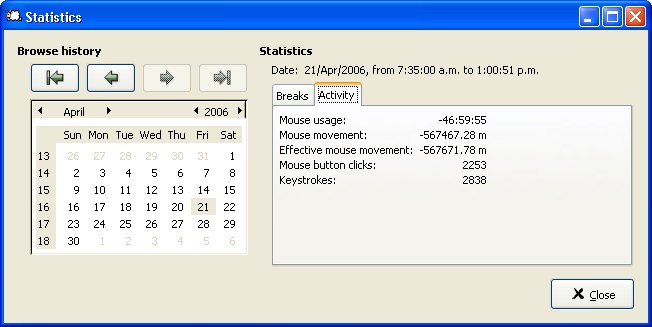 | |||
| Mike | Apr 21 2006 03:03:10 UTC | 50452 | image/jpeg | |
| 320 | Break on 3-monitor configuration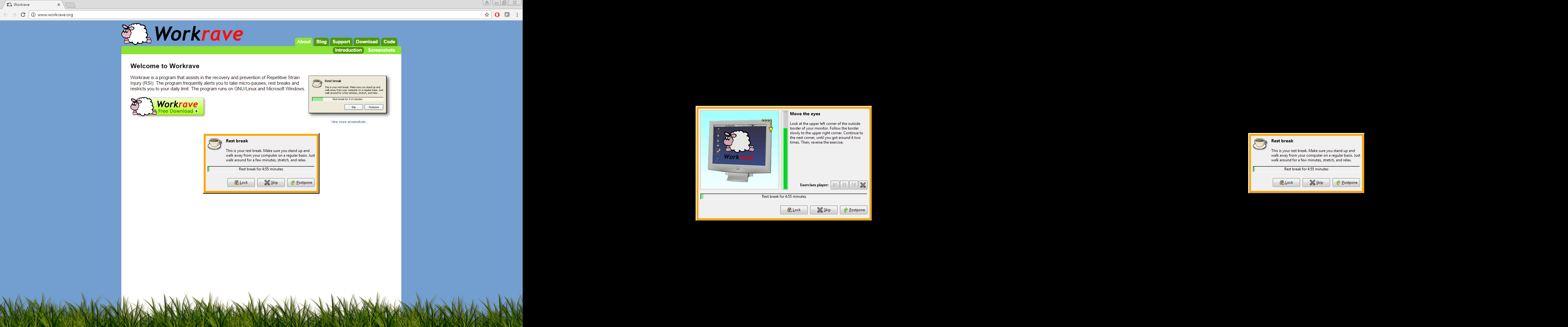 | |||
| Dmitry | Mar 22 2017 10:27:31 UTC | 395534 | image/png | |
| Who | When | What | Removed | Added |
|---|---|---|---|---|
| Rob Caelers | May 8 2005 13:35:22 UTC | status | NEW | ASSIGNED |
| op_sys | Windows 2000 | Windows XP | ||
| Mike | Apr 21 2006 03:08:56 UTC | attachments.description | Picture of the crazy stats I get | The crazy stats I get |
| Marcin Zajaczkowski | Apr 17 2007 08:38:47 UTC | cc | Marcin Zajaczkowski | |
| Rob Caelers | Aug 27 2007 14:03:46 UTC | priority | P2 | P4 |
| bu**@wa**.net | Dec 15 2011 16:17:54 UTC | cc | bu**@wa**.net | |
| Dmitry | Mar 22 2017 10:27:31 UTC | cc | Dmitry |
Description
Daniel Lavi May 8 2005 10:01:24 UTC
(I'm using Windows XP but that's not on the OS list)

I have a multiple-display setup. Workrave works great (thank you!) but when
it's time for a break it blanks only my primary display - while I can't keep
working as the inputs are locked, I can continue reading what's on the
secondary display.
Comment 1
Rob Caelers May 8 2005 13:35:22 UTC
I can't reproduce this on my laptop (with a nightly build). So I have a couple
of questions:

- Is your secondary screen a copy of your primary? or does it have different
content?
- Do you get break warning and break windows on your secondary screen?
- Your block mode (prefs, user interface, general tab) is 'block input and screen'?

I've added XP to the OS list.
Comment 2
Daniel Lavi May 8 2005 14:33:15 UTC
> Is your secondary screen a copy of your primary? or does it have different
content?
Different content. I would check what happens if the secondary is a copy of the
primary but I can't easily find how to switch modes. In any case I would expect
that Workrave would work OK that way (then it's essentially a one-screen
system, surely)

> Do you get break warning and break windows on your secondary screen?
Nope

> Your block mode (prefs, user interface, general tab) is 'block input and
screen'?
Yup. When it's time to stop, there's no putting it off with "skip" either...
Comment 3
Daniel Lavi May 8 2005 16:37:49 UTC
I need to update what I wrote about the break windows (because it just happened
and I realised that it's not always true):

If I'm working on the secondary monitor when it's time to break, the break
window appears on the secondary monitor, but it blanks the primary monitor :-)
Comment 4
Dusty Wilson Jul 15 2005 16:14:36 UTC
This also occurs on my dual-head workstation.  With the new version (1.8.0), it
shows the dialog on both screens, but still only blanks the primary screen.
Comment 5
Mike Apr 21 2006 03:03:10 UTC
Created attachment 54
The crazy stats I get
Comment 6
Mike Apr 21 2006 03:08:56 UTC
Comment on attachment 54
The crazy stats I get

I have a similar problem with my multi-displays.  I don't use the screen blocking, so that is not an issue, but I do use the statistics information - when my mouse pointer goes onto another display (I currently have 2 - moving to 3 displays within the next month) the "Mouse Usage" time, and the Mouse Movement and Effective Mouse Movement all report crazy values (such as -567673.53m as it is currently showing for effective mouse movement, and -47:00:27 as it is showing for Mouse Usage time for today)
Comment 7
bu**@wa**.net Dec 15 2011 16:17:54 UTC
Whilst the -ve statistics values are no longer there, I have noticed that even in the latest version 1.9.4, statistics for mouse usage/movement stop changing as soon as I move my mouse to the secondary monitor on the left.

Note: this is probably because my primary monitor is on the right, so (in Windows XP) as soon as I move my mouse into the left-hand monitor, the mouse X value will become negative. Something like so:

    x=0
     |
 (2) | (1) Primary
 x<0 | x>=0
-----+----- y=0

Maybe this explains why I and some other people are still experiencing multi-monitor blanking problems. (My left-hand secondary monitor doesn't blank during a break).

I can confirm that my mouse activity on the secondary monitor _is_ contributing to the break timings. So it's just the fact that the "Mouse usage", "Mouse movement" and "Effective mouse movement" values do not increase when X goes negative.

Thank you!
Comment 8
Dmitry Mar 22 2017 10:27:31 UTC
Created attachment 320
Break on 3-monitor configuration
Comment 9
Dmitry Mar 22 2017 10:27:53 UTC
I can confirm that the problem still exists with Workrave 1.10 on Windows 7.

When secondary monitor is on the left of the primary monitor, it doesn't get filled with black color (see attached screenshot). Having secondary monitor on the left is useful with 3-monitor configuration.

The root cause is probably the negative screen coordinates:
https://msdn.microsoft.com/en-us/library/dd145136(v=vs.85).aspx