Bug 33 - Missing: snooze progess bar on break window
Status:
VERIFIED FIXED
Component:
GUI :: gtkmm
Version:
unspecified
Hardware:
PC Windows NT
Importance:
P3 normal
Target Milestone:
---
Assignee:
Rob Caelers
URL:
Depends on:
Blocks:
Reported:
Sep 4 2002 20:49:41 UTC
by:
Kees-Jan Dijkzeul
Modified:
Oct 22 2002 01:54:46 UTC
| Id | Who | When | Size | Type |
|---|---|---|---|---|
| 1 | wp prelude window | |||
| Kees-Jan Dijkzeul | Sep 4 2002 21:32:55 UTC | 3707 | image/gif | |
| 2 | wp micropause window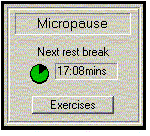 | |||
| Kees-Jan Dijkzeul | Sep 4 2002 21:33:06 UTC | 8242 | image/gif | |
| Who | When | What | Removed | Added |
|---|---|---|---|---|
| Raymond Penners | Sep 4 2002 21:06:01 UTC | status | NEW | ASSIGNED |
| Raymond Penners | Sep 4 2002 21:19:30 UTC | depends_on | 34 | |
| Rob Caelers | Sep 5 2002 18:04:18 UTC | status | ASSIGNED | RESOLVED |
| resolution | FIXED | |||
| Kees-Jan Dijkzeul | Sep 6 2002 21:42:40 UTC | status | RESOLVED | VERIFIED |
Description
Kees-Jan Dijkzeul Sep 4 2002 20:49:41 UTC
When wr tells me to break, the window goes away if I continue working.

It would be nice to have in the window a progress bar, indicating how long it
will take before the window goes away.

Whenever I don't want to break, I tend to start moving the mouse frantically,
pretending to be active, until the window goes away. I'd really like to know
how long I have to continue doing that :-)
Comment 1
Raymond Penners Sep 4 2002 20:54:05 UTC
You're thinking backwards. You don't actually want what you are describing, you
want an ignore button on that window.
Comment 2
Kees-Jan Dijkzeul Sep 4 2002 21:01:52 UTC
You are partially correct. Of course, it would be much more convenient to have
an ignore button, in stead of starting to move the mouse frantically.

Nevertheless, if you take a look at wp behaviour: it first shows a window in
the middle of the screen. Then the window moves to the top of the screen (even
if I don't move the mouse pointer over it), and then it goes away. I very much
like this behaviour, because I can continue working, ignoring the window,
instead of having to stop working and pressing the ignore button.

Still, in this scenario, I'd like to see a progress-bar-like-thingy, telling me
when the window will disappear if I don't press ignore. Then, I can choose to
go through the trouble of pressing ignore (if the window really annoys me), or
resume my efforts to ignore it myself.
Comment 3
Raymond Penners Sep 4 2002 21:06:01 UTC
In the scenario you're depicting, would there be 2 kinds of micropause windows
(i.e. visually different) ? One informing you that a micropause is in the works,
and another for the actual micropause?
Comment 4
Kees-Jan Dijkzeul Sep 4 2002 21:09:06 UTC
That would be current wp behaviour, yes: One button with flashy borders,
telling you it is time to break. And then, when you stop working, (or when wp
insists), you get a different window, telling you you are currently breaking.

Keyboard and mouse are blocked while this second window is shown. The second
window optionally has an "excercises" and "ignore" button. There is also an
indication of how long until the next resbreak c.q. how until daily limit.

If I understand you correctly, you're proposing to put an ignore button in both
windows (or, if we choose to reuse the same window, in that window).

However, the first window, that is telling you you really ought to break,
should jump away whenever the mouse enters (it currently doesn't, but it
should). It's not a good idea to put an "ignore" button in a window that jumps
away whenever you try to enter it. I guess we need an algorithm to "corner" the
window, to keep it from jumping away. Then you could click "ignore" :-)
Comment 5
Raymond Penners Sep 4 2002 21:12:16 UTC
Above you're describing the restbreak window. I was wondering whether the
micropause window also comes in two flavours: a prelude-to-a-pause window, and
the micropause window itself?

I agree that putting a ignore button in the prelude window is not a good idea.
I agree that the restbreak window should have a prelude window.

I am not sure how to visualize a "prelude to a micropause" window. Could you
elaborate on this?
Comment 6
Kees-Jan Dijkzeul Sep 4 2002 21:32:55 UTC
Created attachment 1
wp prelude window

No problem. Prelude...
Comment 7
Kees-Jan Dijkzeul Sep 4 2002 21:33:06 UTC
Created attachment 2
wp micropause window

and micropause
Comment 8
Rob Caelers Sep 5 2002 18:04:18 UTC
Most things are done (at least I think...) except for the ignore button in the
micropause window. I will create a bug for that and resolve this one.