Bug 327 - Custom time progress bar looks ugly on themed systems
Status:
NEW
Component:
GUI :: gtkmm
Version:
unspecified
Hardware:
All All
Importance:
P4 cosmetic
Target Milestone:
---
Assignee:
Raymond Penners
URL:
Depends on:
Blocks:
Reported:
Oct 23 2003 12:28:48 UTC
by:
Raymond Penners
Modified:
Sep 3 2016 16:12:16 UTC
CC List:
Serrano Pereira
Giles Weaver
Steven
| Id | Who | When | Size | Type |
|---|---|---|---|---|
| 210 | Workrave panel applet screenshot | |||
| Giles Weaver | May 8 2010 14:22:55 UTC | 3137 | image/png | |
| 211 | Comparison with the standard GTK progress bar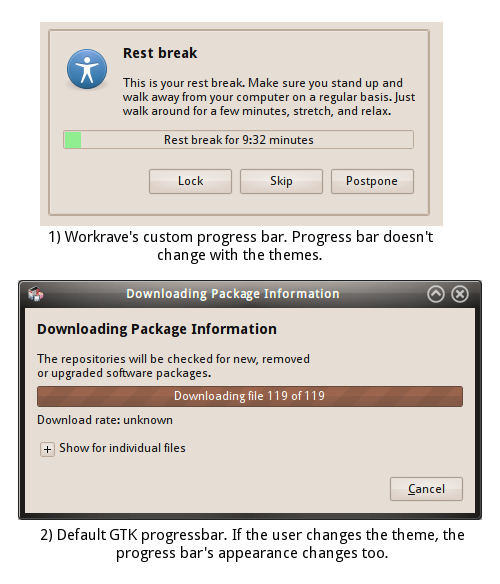 | |||
| Serrano Pereira | May 8 2010 17:27:28 UTC | 54354 | image/png | |
| Who | When | What | Removed | Added |
|---|---|---|---|---|
| Rob Caelers | Aug 27 2007 14:03:39 UTC | priority | P2 | P4 |
| Serrano Pereira | Apr 28 2010 00:01:30 UTC | cc | Serrano Pereira | |
| Giles Weaver | May 8 2010 02:51:44 UTC | cc | Giles Weaver | |
| Steven | Sep 3 2016 16:12:16 UTC | cc | Steven |
Description
Raymond Penners Oct 23 2003 12:28:48 UTC
This one has been bothering me for quite a while now... perhaps Workrave should
at least draw the progress bar trough that comes with the theme...
Comment 1
Serrano Pereira Apr 28 2010 00:01:30 UTC
The same thing has been bothering me as well. I'm a Linux user and the custom progress bar doesn't blend nice with the rest of my desktop. I think the GUI should just use the standard progress bar widget (like the vertical progress bar in the Rest Break window). This way, the progress bar always matches the theme used on the operating system (whether on Windows, Linux or MacOS).
Comment 2
Giles Weaver May 8 2010 02:51:44 UTC
I've been following this bug for a while and am pleasantly surprised that the problem has gone away on upgrading to Ubuntu 10.04.
The bug appears to have been fixed in the Debian 1.9.1-1 release, which incorporated the new upstream 1.9.1 release.

More info here: http://packages.debian.org/changelogs/pool/main/w/workrave/workrave_1.9.1-3/changelog

The Workrave 1.9.1 release notes include the following entries:
# Fixed color in dark UI themes on Gnome.
# Workrave no longer shows two icons on GNOME notification panel
# Fixed tray icon tranparency

I think this bug can probably be marked as resolved/fixed.
Comment 3
Serrano Pereira May 8 2010 07:49:55 UTC
Giles, are we talking about the same bug?

I just got the latest source from github and compiled it. But I can't confirm that the bug has been fixed.

Also, I'm using Ubuntu 10.04 as well which at this moment comes with workrave 1.9.1-2. But the progress bar hasn't been fixed there either.

So as far as I can tell, this "bug" hasn't been fixed yet.
Comment 4
Giles Weaver May 8 2010 14:22:55 UTC
Created attachment 210
Workrave panel applet screenshot

Taken under Ubuntu 10.04 with the Ambiance theme.
This is, I believe, how work workrave should look.
Comment 5
Giles Weaver May 8 2010 14:24:13 UTC
That is strange. Do you have a fresh install of Ubuntu, or did you upgrade? I did a fresh install (I have /home on its own partition).
Have you tried purging Workrave and reinstalling (from Universe)?

I'd suggest renaming .workrave and seeing what happens when it creates a new user profile, but my .workrave is ancient.

I can't reproduce the bug now - could you attach a screenshot so we can tell if I am talking about the same bug?


For info, I am using 10.04 Desktop AMD64.
Comment 6
Serrano Pereira May 8 2010 17:27:28 UTC
Created attachment 211
Comparison with the standard GTK progress bar

It seems we're indeed talking about something different. The progress bar in your screenshot is still the same. I've attached a screenshot to show what I mean. The 2nd dialog's progress bar is how it should look like.