Bug 1280 - preferences dialog
Status:
NEW
Component:
Build-Env
Version:
1.10
Hardware:
PC Windows 10
Importance:
P5 critical
Target Milestone:
---
Assignee:
Rob Caelers
URL:
Depends on:
Blocks:
Reported:
Sep 18 2017 23:55:13 UTC
by:
ai**@gm**.com
Modified:
Sep 20 2017 20:18:10 UTC
CC List:
Kees-Jan Dijkzeul
| Id | Who | When | Size | Type |
|---|---|---|---|---|
| 329 | screenshot of small icon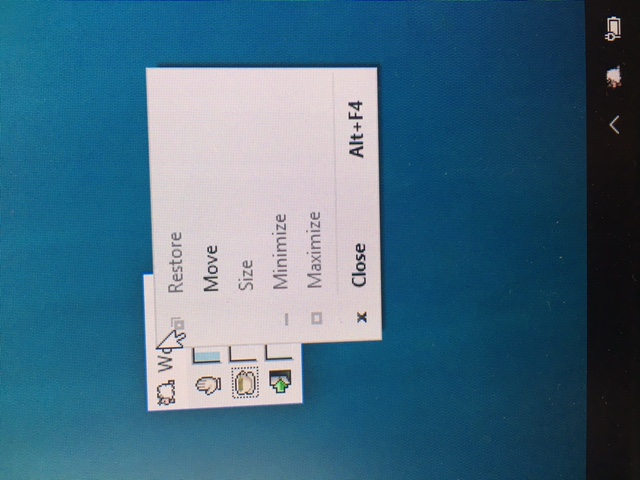 | |||
| ai**@gm**.com | Sep 19 2017 16:54:44 UTC | 96044 | image/jpeg | |
| 330 | screen shot of app short cut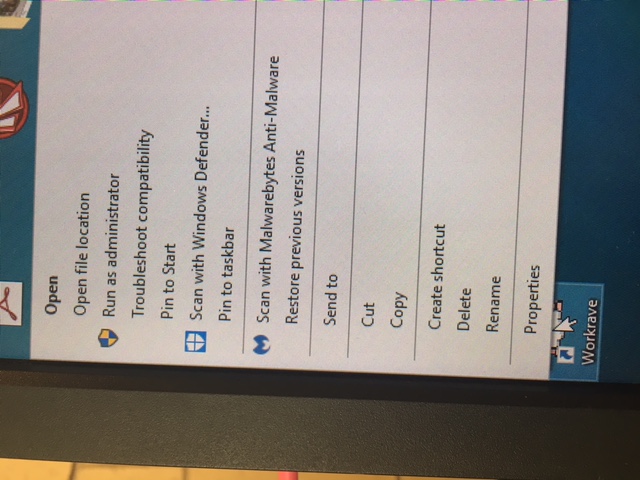 | |||
| ai**@gm**.com | Sep 19 2017 16:56:16 UTC | 110790 | image/jpeg | |
| 331 | Click lower on the workrave window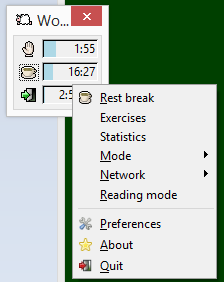 | |||
| Kees-Jan Dijkzeul | Sep 20 2017 05:47:20 UTC | 7922 | image/png | |
| 332 | or click on the sheep icon in the system tray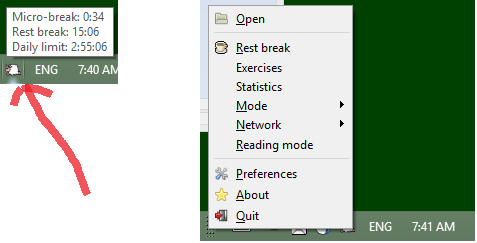 | |||
| Kees-Jan Dijkzeul | Sep 20 2017 05:48:00 UTC | 14234 | image/png | |
| 333 | or click on the toolbar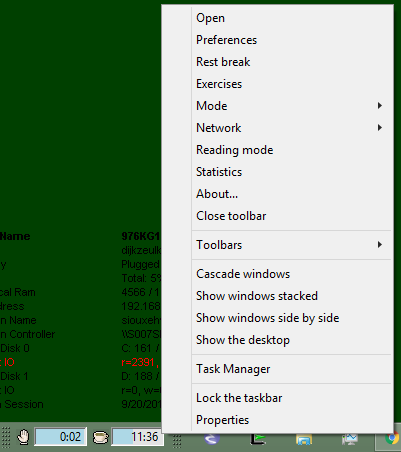 | |||
| Kees-Jan Dijkzeul | Sep 20 2017 05:49:16 UTC | 14738 | image/png | |
| Who | When | What | Removed | Added |
|---|---|---|---|---|
| Kees-Jan Dijkzeul | Sep 19 2017 05:55:37 UTC | cc | Kees-Jan Dijkzeul |
Description
ai**@gm**.com Sep 18 2017 23:55:13 UTC
there is a small box showing time to next mini break, long break and end of work day, but there is no way to open the preferences dialog and change those settings. i've tried installing both the compact and full versions, but neither allows the preference dialog to open. i'm on windows 10 enterprise.
Comment 1
Kees-Jan Dijkzeul Sep 19 2017 05:55:37 UTC
(In reply to aimeelouh from comment #0)

Just to be sure: You are saying that you cannot do one of the following:
* Right click on the workrave main window, and select "preferences" from the context menu
* Right click on the sheep icon in the system tray, and select "preferences" from the context menu
* Right click on the workrave toolbar (assuming you have it enabled), and select "preferences" from the context menu
Comment 2
ai**@gm**.com Sep 19 2017 16:54:44 UTC
Created attachment 329
screenshot of small icon

this is a picture of what happens when i right click on the small icon
Comment 3
ai**@gm**.com Sep 19 2017 16:56:16 UTC
Created attachment 330
screen shot of app short cut

this is a screen shot of what happens when i right click on the desk top app short cut.  maybe there is something i need to enable elsewhere in my computer settings?  thank you for your help.  i'm puzzled. I like what the app does, however, so i would really like to keep it if possible. but i do need to change the settings.
Comment 4
ai**@gm**.com Sep 19 2017 16:57:31 UTC
yes, that's correct. right click does not take me to preferences on the sheep icon or the little pop up. i attached a couple of screen shots so you can see what happens when i do right click.
Comment 5
Kees-Jan Dijkzeul Sep 20 2017 05:47:20 UTC
Created attachment 331
Click lower on the workrave window
Comment 6
Kees-Jan Dijkzeul Sep 20 2017 05:48:00 UTC
Created attachment 332
or click on the sheep icon in the system tray
Comment 7
Kees-Jan Dijkzeul Sep 20 2017 05:49:16 UTC
Created attachment 333
or click on the toolbar
Comment 8
Kees-Jan Dijkzeul Sep 20 2017 05:50:17 UTC
(In reply to aimeelouh from comment #4)

I hope my screenshots clarify where you should click. In all, a menu opens that has a "Preferences" item. Click on that, and work from there.
Comment 9
ai**@gm**.com Sep 20 2017 20:18:10 UTC
Thank you. I can click lower in the workrave window and get preferences. It does not work with the sheep icon, and I can't find the toolbar. But, the good news is that I have a way to get to the preferences.