Bug 1086 - Workrave toolbar seems to disable iTunes toolbar
Status:
NEW
Component:
Core :: Win32
Version:
1.9.4
Hardware:
PC Windows 7
Importance:
P5 minor
Target Milestone:
---
Assignee:
Raymond Penners
URL:
Depends on:
Blocks:
Reported:
Sep 20 2012 17:59:01 UTC
by:
docmon
Modified:
May 26 2013 00:50:52 UTC
CC List:
Rob Caelers
| Id | Who | When | Size | Type |
|---|---|---|---|---|
| 279 | screen shot of toolbar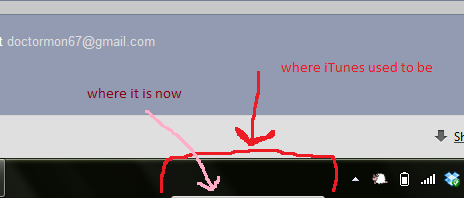 | |||
| docmon | Sep 20 2012 17:59:01 UTC | 275670 | image/bmp | |
| Who | When | What | Removed | Added |
|---|---|---|---|---|
| Rob Caelers | May 26 2013 00:50:52 UTC | cc | Rob Caelers |
Description
docmon Sep 20 2012 17:59:01 UTC
Created attachment 279
screen shot of toolbar

I've seen the bug report that reports a problem with the Workrave toolbar, but it's listed as RESOLVED, so I didn't think anyone would see my post there.

When I downloaded Workrave onto my Windows 7 system I had iTunes running. After the install, the iTunes toolbar would not respond. I had to open the iTunes window from the Start menu to do anything. When I disabled the Workrave toolbar, iTunes worked properly again.

Since then, when I enable the Workrave toolbar, the iTunes toolbar drops down below the screen, below the taskbar. (Perhaps it's being blocked and not "dropping down." That's just what it appears to be doing.) I know it's still there because I can see about a millimeter of a gray line where the iTunes toolbar used to be. I've attached a screenshot.

If I disable the Workrave toolbar, the iTunes toolbar pops back up. Enable Workrave, iTunes disappears. I love, love, love Workrave, and I'd like to see it in my toolbar, although I don't know what that's supposed to look like yet, but I need that iTunes toolbar too.

Thank you!
Comment 1
Rob Caelers May 26 2013 00:50:52 UTC
Not much I can do about this. You probably need to unselect 'lock taskbar' and make the toolbar area large enough for itunes and workrave.