Bug 1074 - Applet no longer displays properly in xfce4-panel
Status:
NEW
Component:
Core :: UNIX
Version:
cvs
Hardware:
All Linux
Importance:
P5 normal
Target Milestone:
---
Assignee:
Rob Caelers
URL:
http://bugs.debian.org/cgi-bin/bugreport.cgi?bug=677469
Depends on:
Blocks:
Reported:
Jun 24 2012 09:38:20 UTC
by:
Francois Marier
Modified:
Jun 20 2017 18:48:01 UTC
CC List:
Aleksej
pjh
Giles Weaver
| Id | Who | When | Size | Type |
|---|---|---|---|---|
| 287 | workrave in Cinnamon shell (Linux Mint 15)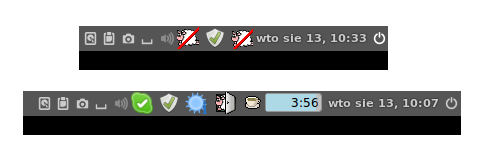 | |||
| Mateusz | Aug 13 2013 10:53:53 UTC | 14745 | image/png | |
| 301 | Mint 17.1 / Cinnamon 2.4.5 timer missing | |||
| Giles Weaver | Dec 8 2014 21:48:27 UTC | 5635 | image/png | |
| Who | When | What | Removed | Added |
|---|---|---|---|---|
| Aleksej | Jun 30 2012 12:37:35 UTC | cc | Aleksej | |
| Giles Weaver | Nov 7 2012 23:17:36 UTC | cc | Giles Weaver | |
| Filipus Klutiero | Nov 18 2014 03:40:47 UTC | cc | Filipus Klutiero | |
| Giles Weaver | Dec 8 2014 21:45:39 UTC | cc | Giles Weaver | |
| Giles Weaver | Dec 19 2014 12:26:39 UTC | cc | Giles Weaver | |
| Filipus Klutiero | May 30 2015 15:25:40 UTC | cc | Filipus Klutiero | |
| pjh | Jun 20 2017 18:48:01 UTC | cc | pjh |
Description
Francois Marier Jun 24 2012 09:38:20 UTC
Using the latest (i.e. unreleased) version from git (abc941eb70), Debian XFCE users have reported the following:

"After updating workrave from 1.9.4-3 to 1.9.909+abc941eb70-1, the applet
no longer displays properly in xfce4-panel.  When the applet starts up,
the timers that should appear to the right of the sheep icon do not
appear, and the applet's width is correspondingly lesser.  Fussing with
the UI settings may make the applet expand its width momentarily, but it
pops back after a few seconds, and the timers are still never displayed."
Comment 1
Giles Weaver Nov 7 2012 23:17:36 UTC
(In reply to comment #0)
> Using the latest (i.e. unreleased) version from git (abc941eb70), Debian
> XFCE users have reported the following:
>
> "After updating workrave from 1.9.4-3 to 1.9.909+abc941eb70-1, the applet
> no longer displays properly in xfce4-panel.  When the applet starts up,
> the timers that should appear to the right of the sheep icon do not
> appear, and the applet's width is correspondingly lesser.  Fussing with
> the UI settings may make the applet expand its width momentarily, but it
> pops back after a few seconds, and the timers are still never displayed."

I'm seeing exactly the same behaviour with the Cinnamon desktop (http://cinnamon.linuxmint.com/). It's a crying shame that Gnome-Shell, Unity, Cinnamon and XFCE all use different applet/indicator systems despite all being based on GTK, but none the less, I'm sure users of all these interfaces would be very grateful to see the applet displaying in all of its glory.
Comment 2
Mateusz Aug 13 2013 10:53:53 UTC
Created attachment 287
workrave in Cinnamon shell (Linux Mint 15)

Hey

I just installed Linux Mint 15 with Cinnamon shell and have similar problem. Please glance at attachment. Is any chance to fix it in the nearest future?

Sometimes in works properly if I rerun program and restart Cinnamon
Comment 3
Filipus Klutiero Nov 18 2014 03:40:47 UTC
This report is based on downstream ticket #677469. It is not mentioned which Xfce version is affected, but according to Xfce ticket #5874, this is an Xfce bug which is now fixed. I do not use Xfce, but I suggest to close this unless this can be reproduced with a current Xfce version.
Comment 4
Aleksej Nov 18 2014 09:20:27 UTC
Still no timer here on Debian jessie/sid (Xfce 4.10.1).
Comment 5
Filipus Klutiero Nov 18 2014 16:18:41 UTC
yandex, I suppose you have the applet preference enabled?
Comment 6
Aleksej Nov 18 2014 19:00:41 UTC
(In reply to Filipus Klutiero from comment #5)
> yandex, I suppose you have the applet preference enabled?

Of course.
Comment 7
Giles Weaver Dec 8 2014 21:45:39 UTC
Still no timer here on Mint 17.1 (Cinnamon 2.4.5).

Occasionally the timer will briefly appear (sometimes just a few pixels of it), before reverting to showing just the sheep without the timer.
Comment 8
Giles Weaver Dec 8 2014 21:48:27 UTC
Created attachment 301
Mint 17.1 / Cinnamon 2.4.5 timer missing

This screenshot is from workrave 1.10.5.0-ppa1~trusty1, but the behaviour is the same with 1.10.1-4 (and also Debian Stable & Testing with xfce).
Comment 9
Aleksej Dec 18 2014 09:54:55 UTC
(In reply to Giles Weaver from comment #7)
I've seen it work once, probably because the panel was running with more default settings, or because the programs happened to start in a different order.
Comment 10
Rob Caelers Dec 19 2014 12:03:36 UTC
FYI: I'm working on an xfce and cinnamon applet. mate is also planned.
Comment 11
Giles Weaver Dec 19 2014 12:23:53 UTC
I saw that (I've been watching workrave on github).

I'd be happy to help test it, but I didn't get very far when I tried to compile it..
If I knew which dependencies to install (I'm running Mint 17.1, so as per Ubuntu 14.04) I'd probably get a bit further. I was missing libtool for one.

Or I could wait for the PPA :-)
Comment 12
Aleksej Dec 20 2014 11:45:39 UTC
(In reply to Aleksej from comment #4)
> Still no timer here on Debian jessie/sid (Xfce 4.10.1).

Then I tried tweaking settings, but got nothing.
Yesterday (the next day), it worked, and it works today.

On the 18th and the 19th, I have upgraded, among others:
gnome-shell
*apparmor*
gnome-tweak-tool
Comment 13
Giles Weaver May 30 2015 14:26:44 UTC
This bug appears to be fixed for Xfce in 1.10.6 (Debian 1.10.6-1+b1), but not for Cinnamon.

The Workrave NEWS file states (under 1.10.6):
** Applets added for Cinnamon, XFCE and MATE.

However, there doesn't appear to be an --enable-cinnamon configure switch (there are --enable-xfce and --enable-mate switches) in 1.10.6, and the applet does not display properly with the Debian packaged version of 1.10.6.

I'm not sure if this is an omission in Workrave, or with the Debian packaging?
Comment 14
Francois Marier May 30 2015 23:29:20 UTC
For reference, here's the configure line that's used in the Debian package:

https://anonscm.debian.org/cgit/collab-maint/workrave.git/tree/debian/rules#n8
Comment 15
Giles Weaver May 31 2015 03:25:43 UTC
I have done some further testing under Debian 8.

With Workrave 1.10.6-1+b1 (from Testing), the applet appears to work correctly in Mate, despite the package apparently having been configured without Mate support.

With workrave_1.10.6.0-ppa1~vivid1_amd64.deb, workrave-cinnamon_1.10.6.0-ppa1~vivid1_amd64.deb and workrave-data_1.10.6.0-ppa1~vivid1_all.deb from the Workrave PPA (still installed under Debian) the results are the same. The applet appears to display properly under XFCE & Mate, but not Cinnamon.

It's possible that the Cinnamon developers expect the applet to occupy the space of a typical square icon, and that it needs to be treated as a special case in order to display properly?
Comment 16
pjh Jun 20 2017 18:48:01 UTC
I'm also still seeing this applet issue (no timer, just a sheep icon) with Cinnamon. I built Workrave from the tip of branch_v1_10 (fe7b163e30cfcb2152edde3e63b60f7103c804d9) today and tried to enable various configure options but to no avail.

$ cinnamon --version
Cinnamon 3.2.7

$ ./configure --enable-gconf --enable-xfce --enable-indicator
...
                        Workrave 1.10.16.0
                       ===================

                        prefix:   /usr/local

                           OS :   Unix

          GConf configuration :   no
      GSettings configuration :   yes
            XML configuration :   yes

            Activity Monitors :   mutter,record,screensaver,x11events

                      Gtk GUI :   yes (Gtk3)
              Gnome 2 support :   no
              Gnome 3 support :   yes
GObject-Introspection support :   yes
            Indicator support :   yes
                 XFCE support :   yes
                 MATE support :   no
                 DBUS support :   yes (GIO)
           Networking support :   yes
            GStreamer support :   yes
           Pulseaudio support :   yes
                    Exercises :   yes

                C++11 support :   no
        Experimental features :   no
                    Debugging :   no
                   Debug logs :   no
                    Test code :   no