Bug 1054 - Can't install 1.9.4, installer reports that workrave is still running...
Status:
RESOLVED FIXED
Component:
Build-Env
Version:
1.9.4
Hardware:
PC Windows 7
Importance:
P5 normal
Target Milestone:
---
Assignee:
Rob Caelers
URL:
Depends on:
Blocks:
Reported:
Nov 23 2011 21:23:16 UTC
by:
Andrey Solis
Modified:
May 13 2012 00:47:37 UTC
CC List:
David Mehl
| Id | Who | When | Size | Type |
|---|---|---|---|---|
| 266 | Workrave is still running.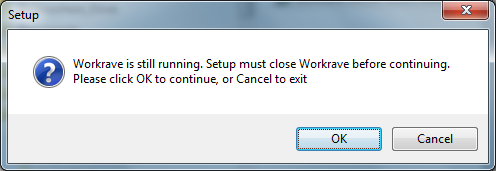 | |||
| Andrey Solis | Nov 23 2011 21:23:16 UTC | 32437 | image/png | |
| 267 | After clicking Ok to the first window, shows failed to close workrave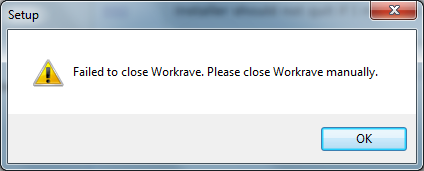 | |||
| Andrey Solis | Nov 23 2011 21:24:36 UTC | 27189 | image/png | |
| Who | When | What | Removed | Added |
|---|---|---|---|---|
| Rob Caelers | Feb 11 2012 14:20:07 UTC | status | NEW | RESOLVED |
| resolution | FIXED | |||
| David Mehl | May 13 2012 00:47:37 UTC | cc | David Mehl |
Description
Andrey Solis Nov 23 2011 21:23:16 UTC
Created attachment 266
Workrave is still running.

I recently change my computer, then I downloaded and tried to run the 1.9.4 MSI (Windows) installer.  I have administration rights in the computer etc...
but...
The installer prompted me that i have workrave running!! (That's impossible!) and ask me to close it first, i have nothing to close, so i close the setup.
I downloaded the setup again but the installer always said that WorkRave was still running and that I needed to close it first...

I found a quick solution in:
http://sourceforge.net/mailarchive/message.php?msg_id=27667851

As Rob says: "It seems that if an explorer window is in the 'Program Files\Workrave' directory, that explorer window is also called 'Workrave'"

I was trying to install from a directory named Workrave, so as the above message said, i change the name of the directory to Workrave_Installer, and now the setup didn't ask me to close workrave, and now the setup is working good.
Comment 1
Andrey Solis Nov 23 2011 21:24:36 UTC
Created attachment 267
After clicking Ok to the first window, shows failed to close workrave

After clicking Ok to the first window, shows failed to close workrave
Comment 2
Rob Caelers Feb 11 2012 14:20:07 UTC
Thanks. This bug should be fixed now.
Comment 3
David Mehl May 13 2012 00:47:37 UTC
This also happened to me. I had 1.9.3 installed, and wanted to upgrade to 1.9.4. I uninstalled 1.9.3, but did not reboot before trying to install 1.9.4. The install failed, and I took my reboot. But now Workrave will not install. The error messages are as above. I read the notes below, and figured out that I had a folder named Workrave open, and renamed it. The install worked fine after that. Thanks for the good notes below.