Bug 1037 - When networking is configured on Windows 7, WorkRave crashes (and every startup thereafter)
Status:
NEW
Component:
Core :: Win32
Version:
1.9.4
Hardware:
PC Windows 7
Importance:
P5 critical
Target Milestone:
---
Assignee:
Raymond Penners
URL:
Depends on:
Blocks:
Reported:
Sep 8 2011 11:17:29 UTC
by:
ma**@gm**.com
Modified:
May 29 2013 15:21:40 UTC
CC List:
Aleksej
ma**@gm**.com
Ray Satiro
Rob Caelers
Paul Walker
Arief Wibowo
| Id | Who | When | Size | Type |
|---|---|---|---|---|
| 271 | Crash Log | |||
| Arief Wibowo | Mar 19 2012 11:48:06 UTC | 14178 | text/plain | |
| 272 | Micro-break prompt, even without any usage. (The only usage was to capture the screenshot)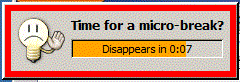 | |||
| Arief Wibowo | Mar 24 2012 03:25:31 UTC | 6454 | image/gif | |
| Who | When | What | Removed | Added |
|---|---|---|---|---|
| ma**@gm**.com | Sep 8 2011 11:31:51 UTC | cc | ma**@gm**.com | |
| Rob Caelers | Oct 22 2011 18:17:16 UTC | cc | Rob Caelers | |
| Arief Wibowo | Mar 19 2012 11:57:43 UTC | cc | Arief Wibowo | |
| Paul Walker | Jun 7 2012 13:59:03 UTC | cc | Paul Walker | |
| Ray Satiro | Sep 6 2012 05:55:35 UTC | cc | Ray Satiro | |
| Aleksej | May 29 2013 15:21:40 UTC | cc | Aleksej |
Description
ma**@gm**.com Sep 8 2011 11:17:29 UTC
Some time after a host is added WorkRave crashes on Windows 7. If you restart or even reinstall/restart, Workrave crashes as well. Reproducible on both machines (both Windows 7).

Dialog box contains information:

glibmm-ERROR **:
unhandled exception (type std::exception) in signal handler: what: std::exception

aborting...

Windows crash information:
Problem signature:
  Problem Event Name:	APPCRASH
  Application Name:	Workrave.exe
  Application Version:	1.9.4.0
  Application Timestamp:	4d8b7749
  Fault Module Name:	libglib-2.0-0.dll
  Fault Module Version:	2.20.5.0
  Fault Module Timestamp:	4a9ed1c6
  Exception Code:	40000015
  Exception Offset:	00033648
  OS Version:	6.1.7600.2.0.0.256.4
  Locale ID:	1033
  Additional Information 1:	9b08
  Additional Information 2:	9b0885ac8a01f6cad3da0db848c8a88c
  Additional Information 3:	f23c
  Additional Information 4:	f23c411951ea2ca14cf9aea31fbb0593
Comment 1
Rob Caelers Oct 22 2011 18:17:16 UTC
I will try to reproduce this problem.

To get Workrave running again, you could open regedit.exe and delete the following key:

HKEY_CURRENT_USER\Software\Workrave\distribution
Comment 2
Arief Wibowo Mar 19 2012 11:48:06 UTC
Created attachment 271
Crash Log

Hi,

I have a same problem as described here (crash on startup), but I notice the problem right after my computer resumed from hibernation.

While searching your sourceforge downloads, I found a debug version and installed it. Attached is the crash log created by it.

Before installing the debug version, I have:
- Uninstalled the application,
- Searched the computer for any files/folders called Workrave and deleted them,
- Searched the registry for any keys containing Workrave and deleted them, except the ones related to sound notification. (Hence, HKEY_CURRENT_USER\Software\Workrave\distribution is deleted)

Additionally, this issue is reproducible on Windows 7 x64, which connects to another Workrave on Windows Server 2008 R2 (networking), which is always on.

Thanks.
Comment 3
Arief Wibowo Mar 19 2012 11:57:43 UTC
Hi,

In addition to my previous comments, after I restarted, I get this error on the command prompt window:

terminate called after throwing an instance of 'SocketException'
  what():  std::exception

This application has requested the Runtime to terminate it in an unusual way.
Please contact the application's support team for more information.

Thanks.
Comment 4
Rob Caelers Mar 21 2012 21:15:51 UTC
Could you please check if this build fixes the problem:

http://snapshots.workrave.org/20120321/workrave-win32-v1_9_906-51-g62b587dca6-dirty-20120321-installer.exe


Thanks!
Comment 5
ma**@gm**.com Mar 23 2012 18:10:36 UTC
Unfortunately I don't have access to the setup anymore.
Comment 6
Arief Wibowo Mar 24 2012 03:25:31 UTC
Created attachment 272
Micro-break prompt, even without any usage. (The only usage was to capture the screenshot)

Now, the Workraves (client and server) has problem detecting computer usage:
- I do not use the server machine, but Workrave detects usage, prompts for micro-break, and give the buzz after 30 seconds.

- I stopped using the client machine as soon as Workrave prompts for micro-break, it still gives buzz after 30 seconds. (see attached screenshot)

- Sometimes, client Workrave successfully detected no usage, and goes to the micro-break screen, but this screen detects usage, so the timer freezes and flashing orange border.

And, no matter I use or not, Workrave timer keeps running down (it was 2 minutes when I started typing this comment, now it is -5 minutes).

But, both timers seems to sync properly, and I haven't get a crash so far.

Thanks.

(In reply to comment #4)
> Could you please check if this build fixes the problem:
>
> http://snapshots.workrave.org/20120321/workrave-win32-v1_9_906-51-g62b587dca6-dirty-20120321-installer.exe
>
>
> Thanks!
Comment 7
Arief Wibowo Mar 24 2012 03:34:17 UTC
And I just found out that the server Workrave hangs when I quit it. The process has constant CPU usage of 25% (which based on my experience means it is stuck in a deadlock).

So I killed it and restarted Workrave. Now, it detects usage correctly, and no longer has quitting issue.

Therefore, I can say that Workrave behaves correctly when not connected to each other, has detection problem when connected to each other, but no more crashes.

Thanks.
Comment 8
Paul Walker Jun 7 2012 13:59:03 UTC
Hi

(In reply to comment #4)
> Could you please check if this build fixes the problem:
>
> http://snapshots.workrave.org/20120321/workrave-win32-v1_9_906-51-
> g62b587dca6-dirty-20120321-installer.exe
>
>
> Thanks!

Fixes the problem for me - it's not crashing any more, the two Workrave instances connect to each other, and the timers appear to be working correctly.

Though the client ID looks a little odd:

[07/06/2012 12:54:18] Client c52d529eb2a39786b8703eb94fc6381d:27273 is welcoming us.

Is that due to it being a snapshot?

Thanks,
Paul
Comment 9
Paul Walker Jun 7 2012 14:22:09 UTC
Hi,

Looks like I spoke too soon - nothing crashes, but the timers are continually running. That seems to be the case whether the two instances are connected or not.

Paul